Salesforce MCP Security: Data Access, Permissions, and Agent Risk
A sales leader asks an AI agent to prepare a short account brief before a customer call. The agent connects to Salesforce through MCP, searches the account, reads contacts, reviews open opportunities, checks recent cases, and pulls notes, tasks, support history, and customer context.
The final summary looks useful. It saves time. But the access path is more complex than the output suggests. The agent may touch Salesforce objects with different risk levels. An account name may be safe to summarize, while an opportunity amount, case comment, renewal note, or custom field may contain sensitive commercial, legal, security, or escalation detail.
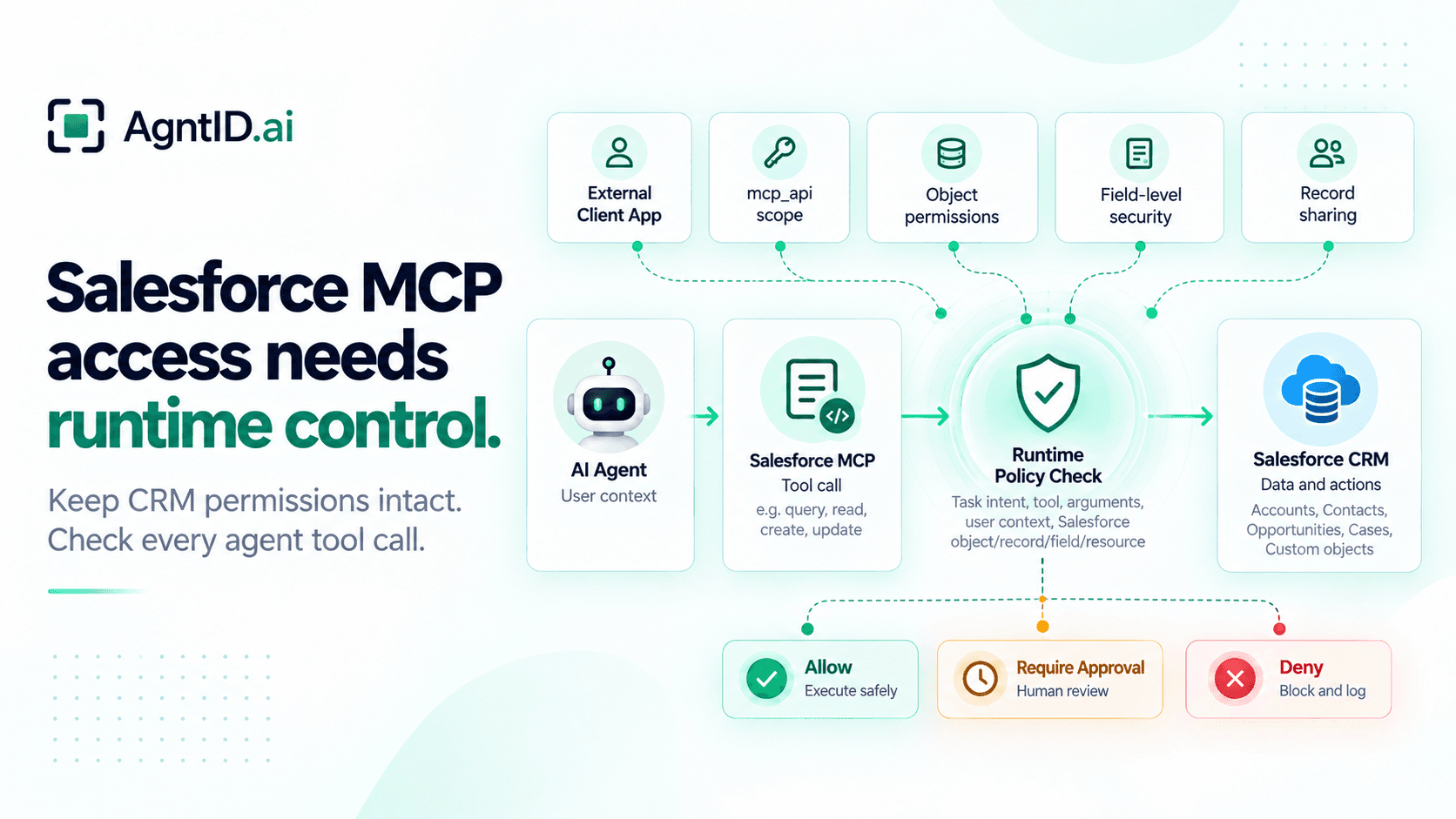
Salesforce already provides the core access model. Salesforce Hosted MCP Servers enforce per-user authentication and respect Salesforce field-level security, object permissions, and sharing rules for every tool call. Salesforce Hosted MCP Servers reference
That foundation matters. It should stay intact. For agent workflows, the next question sits alongside Salesforce permissions: should this agent call this MCP tool, against this Salesforce object, with these fields and arguments, for this task?
What Salesforce MCP Enables
Model Context Protocol, or MCP, gives AI clients a standard way to connect to tools and data exposed by servers. Salesforce MCP servers expose Salesforce tools, CRM records, and actions that AI clients can call. Salesforce describes MCP servers as systems that contain tools, prompts, and resources. An MCP client connects to those servers so an agent can call tools in conversation. Salesforce MCP for Agentforce documentation
For this guide, Salesforce MCP is the main object. Agentforce is related context. Agentforce can use MCP, but this page is about MCP access to Salesforce data and tools.
A Salesforce MCP integration can let an agent read account context, search contacts and leads, review opportunities, inspect case history, read notes and tasks, query standard or custom objects, create or update records, and invoke Salesforce logic through exposed tools. The exact risk depends on which MCP servers and tools are enabled.
Salesforce's standard MCP server reference separates server capabilities. SObject All exposes create, read, update, delete, query, search, and relationship traversal across standard and custom objects. Salesforce also provides scoped options such as SObject Reads, SObject Mutations, and SObject Deletes when teams want narrower access. A meeting-prep agent should not inherit write or delete access because another workflow needs it. A read-only CRM assistant and a write-capable revenue agent should have different access paths. Salesforce standard MCP server reference
Salesforce MCP Risk Matrix
Salesforce MCP risk is not only read vs write. The object, field, record scope, tool, task, and destination all matter.
| MCP action | Salesforce data | Main risk | Control needed |
|---|---|---|---|
| Account brief | Account, contacts, opportunities, cases | Agent pulls more customer context than the task needs | Object, record, field, and task checks |
| Contact lookup | Contacts, leads, relationship fields | Personal or outreach data is exposed too broadly | Field filtering and record scope |
| Opportunity review | Amount, stage, close date, forecast, next steps | Pipeline and forecast data leaks into the wrong workflow | Object access, field-level security, and task limits |
| Case summary | Cases, comments, support history | Private support context enters a general CRM summary | Case scope and destination control |
| Notes and tasks review | Notes, tasks, events, activity | Informal internal context is reused outside its intent | Object and field restrictions |
| Record update | Opportunity, case, task, account | Agent changes Salesforce state incorrectly | Runtime authorization and approval |
| Flow or Apex action | Salesforce automation | Downstream action runs without task fit | Tool policy and approval |
| Record export | Accounts, contacts, opportunities | Broad extraction happens through a valid user context | Bulk limits and deny rules |
The goal is controlled Salesforce MCP access. Keep the user's Salesforce permissions intact, while narrowing what the agent can do for the task.
Salesforce External Client Apps and OAuth
Salesforce Hosted MCP uses External Client Apps for MCP client registration and authentication. Salesforce documentation says to use an External Client App to connect an MCP client to a Salesforce org. It also notes that Connected Apps are not supported for that hosted MCP connection path. Salesforce External Client App setup
This changes the starting point for a security review. Many Salesforce teams are used to reviewing Connected Apps. For Hosted MCP, start with the External Client App and review which MCP client can connect, which users can authorize it, which OAuth scopes are granted, whether refresh-token access is enabled, how long tokens last, whether tokens rotate, whether the client is limited to approved users, and whether access can be revoked quickly.
Salesforce recommends a dedicated External Client App for each MCP client instead of sharing one app across clients. This gives teams a clearer view of which client is accessing which MCP servers. Salesforce also notes that External Client App access can be restricted to pre-authorized users through profiles or permission sets. How to secure Salesforce Hosted MCP Servers
For production, create a dedicated permission set for Salesforce MCP users. Assign it only to approved teams. Review it like any other privileged access path.
OAuth Scopes and API Permissions
For Salesforce Hosted MCP, the key OAuth scope is mcp_api. Salesforce says the mcp_api scope grants access to Salesforce Hosted MCP Servers and avoids exposing the broader api scope, which grants access to Salesforce Platform APIs such as REST, Tooling, and Metadata APIs. How to secure Salesforce Hosted MCP Servers
Use the narrowest scope that supports the workflow. An account-summary agent should not need full Salesforce API access. A case-review assistant should not need delete tools. An opportunity assistant should not update forecast fields unless that workflow is approved.
Review scope design through the workflow. Confirm whether the agent needs MCP access only, whether refresh-token access is required, whether the session can be shorter, whether read-only and write-capable workflows can be split, whether high-risk tools need a separate client, and whether mutation tools can stay disabled until needed.
Salesforce setup guidance includes mcp_api and refresh_token in the External Client App flow. It also recommends refresh-token rotation so old tokens are invalidated when new ones are issued. Refresh tokens deserve extra scrutiny. If an MCP client keeps long-lived access, a compromised client can keep acting after the first session. Shorter validity, rotation, revocation, and user-scoped access reduce the blast radius. Salesforce External Client App setup
Objects, Records, and Fields
Salesforce permissions answer one question: what can this user access under the Salesforce security model? Salesforce access is layered. Profiles, permission sets, and permission set groups control object-level and field-level access. Sharing settings, role hierarchy, territories, and restriction rules affect which records users can access. Salesforce data access documentation
Salesforce Hosted MCP Servers apply those controls to tool calls. Object permissions, field-level security, sharing rules, profile permissions, and permission sets apply to Salesforce Hosted MCP transactions. Salesforce Hosted MCP read-only server documentation
That is the outer boundary. The inner boundary is task fit. A user may have access to an account, but the agent may not need every related opportunity, note, case comment, task, and custom field. A user may have access to opportunities, but the agent may not need amount, forecast category, probability, discount notes, or approval history. A user may have access to cases, but the agent may not need private troubleshooting notes or internal escalation comments.
For Salesforce MCP, each object should be reviewed through the tool call. Ask which MCP tool can access the object, which fields the tool can return, which records it can search, whether it can traverse relationships, whether it can query broadly, whether it can write or delete, and whether it can trigger downstream logic. This is where Salesforce permission review becomes MCP security review.
Field-Level Security in Agent Workflows
Field-level security becomes more important when agents receive structured tool output. In the Salesforce UI, a user sees fields through record pages, layouts, reports, and list views. In an MCP workflow, the tool may return structured data directly to an AI model. The model can then reason over that data, summarize it, or move it into another system.
Salesforce field-level security controls whether users can see or edit specific fields on an object. For Salesforce MCP, review access to fields such as discount fields, legal notes, renewal risk, churn risk, support escalation notes, security review status, commercial terms, internal account notes, forecast fields, executive comments, personal contact details, and custom fields with customer-specific context. Salesforce data access documentation
The right question is not only "Can the user see this field?" The better question is "Should an agent receive this field for this task?" A sales manager may need renewal risk across a portfolio. A meeting-prep agent may need only a short account summary. A support agent may need case history. A marketing agent may need industry, segment, and lifecycle stage. These workflows should not receive the same field set.
User-Context Access
Salesforce Hosted MCP is designed around user-context access. Salesforce's security guidance says MCP sessions are tied to the individual Salesforce user account. It also says there is no option to use a shared service account as the principal user for all sessions, and describes that shared-principal pattern as an anti-pattern for this model. How to secure Salesforce Hosted MCP Servers
This design preserves accountability. If the user can access a record, the agent can act within that user's Salesforce permission boundary. If the user loses access, the agent loses that access too.
But user-context access does not remove the need for task-level checks. A human user usually clicks through Salesforce with visible context. An agent can call tools quickly, make many requests, combine records across objects, move Salesforce context into another system, and write changes based on model reasoning. The user's Salesforce access is the ceiling. The agent's task should define the narrower operating space.
Risky Salesforce MCP Workflows
The riskiest Salesforce MCP workflows are broad, write-heavy, or cross-system.
Examples include:
- Updating opportunity stage, amount, close date, probability, or forecast category.
- Changing account owner, territory, or account status.
- Closing cases.
- Writing internal notes.
- Creating tasks at scale.
- Exporting contact or lead lists.
- Running broad object queries.
- Invoking flows or Apex actions with downstream impact.
- Moving Salesforce context into Slack, email, tickets, spreadsheets, or documents.
Reading Salesforce data can also be risky. A broad read can expose more customer context than the task needs. But writes need stronger control because they change the system of record.
A practical policy can start with simple defaults: allow narrow read-only summaries, allow case review only for scoped customer workflows, allow contact lookup only for records in scope, require approval before opportunity updates, require approval before case closure, require approval before customer-facing messages, deny delete actions by default, deny bulk export by default, and deny unbounded queries by default. This approach keeps useful workflows open while controlling actions that change Salesforce state or move sensitive context.
Runtime Policy Example
Salesforce permissions define what the user can access. Runtime policy defines what the agent can do with that access for the current task.
A Salesforce MCP account-briefing policy could look like this:
{
  "policy": "salesforce_mcp_account_briefing",
  "applies_to": {
    "connector": "salesforce_mcp",
    "tool": "get_account_briefing"
  },
  "allow_when": {
    "user_has_salesforce_record_access": true,
    "task_type": "account_briefing",
    "objects_allowed": ["Account", "Contact", "Opportunity", "Case"],
    "record_scope": "requested_account_and_related_records",
    "fields_blocked": [
      "Discount_Approval_Notes__c",
      "Legal_Review_Notes__c",
      "Internal_Churn_Risk__c"
    ],
    "max_records": 50,
    "write_actions": false
  },
  "require_approval_when": {
    "requested_action": [
      "update_opportunity",
      "close_case",
      "send_customer_message",
      "export_records"
    ]
  },
  "deny_when": {
    "task_intent": "bulk_export",
    "record_scope": "cross_territory",
    "tool_arguments_contain_unbounded_query": true
  }
}
The policy does not replace Salesforce permissions. It narrows the agent's Salesforce MCP action before the tool call runs.
A request can be allowed, denied, narrowed, or sent for approval. The decision can include the user, agent, task, MCP client, Salesforce object, record scope, fields, tool arguments, and destination.
Where Runtime Authorization Fits
Salesforce gives the agent a permission-aware access path into CRM data and tools. Configure that path through External Client Apps, OAuth scopes, permission sets, object permissions, record visibility, and field-level security.
Runtime authorization does not replace that model. It adds the task-level decision before the MCP tool call runs. AgntID evaluates policy, task intent, tool, arguments, Salesforce object, record, field, or resource, and user context. Then it determines whether the Salesforce MCP call should proceed, be denied, or require approval.
This creates a clear boundary. Salesforce determines what the user can access under the Salesforce security model. AgntID determines whether the agent's specific Salesforce MCP action fits the task. An agent may be allowed to summarize an account but not update an opportunity, read open cases but not close a case, create a follow-up task but not send a customer email, inspect a contact but not export a contact list, or retrieve recent activity but not pull every note attached to an account.
For Salesforce MCP, the tool call is the control point.
Salesforce MCP Security Checklist
Use this checklist before giving agents Salesforce access through MCP.
1. Define the Salesforce MCP workflow
Write down what the agent should do. Examples include account briefing, opportunity review, contact lookup, case summary, task creation, record update, or flow execution.
2. Choose the narrowest Salesforce MCP capability
Use read-only servers and tools for read-only workflows. Do not expose mutation or delete tools unless the workflow requires them.
3. Use an External Client App
For Salesforce Hosted MCP, use an External Client App. Salesforce documentation says this is the supported path for connecting an MCP client to a Salesforce org. Salesforce External Client App setup
4. Limit OAuth scopes
Prefer mcp_api for hosted MCP access. Avoid the broader api scope unless the workflow has a separate need for Salesforce Platform API access.
5. Restrict approved users
Use permission sets or profiles to pre-authorize approved users. Do not make MCP client access available to the whole org by default.
6. Review Salesforce objects, records, and fields
Check Accounts, Contacts, Leads, Opportunities, Cases, Notes, Tasks, Events, and custom objects. Review field-level security for sensitive fields.
7. Separate read and write paths
Keep read-only summaries separate from workflows that create, update, delete, or trigger automation.
8. Require approval for sensitive actions
Require approval for opportunity changes, case closure, broad exports, customer-facing messages, and flow or Apex actions with downstream impact.
9. Log every Salesforce MCP tool call
Capture the user, agent, MCP client, task, tool, Salesforce object, record scope, fields, arguments, policy decision, approval state, and result.
Frequently Asked Questions
What is Salesforce MCP?
Salesforce MCP lets AI clients connect to Salesforce tools, CRM records, and actions through Model Context Protocol.
What is a Salesforce MCP server?
A Salesforce MCP server exposes Salesforce data and actions as tools that AI agents can call.
What is Salesforce MCP security?
Salesforce MCP security controls how agents access Salesforce data, call tools, use OAuth scopes, and perform CRM actions through MCP.
Does Salesforce MCP respect Salesforce permissions?
Yes. Salesforce Hosted MCP applies the authenticated user's object permissions, field-level security, sharing rules, profiles, and permission sets.
What OAuth scope does Salesforce MCP use?
Salesforce Hosted MCP uses the mcp_api scope for MCP server access.
Does Salesforce MCP use Connected Apps or External Client Apps?
Salesforce Hosted MCP uses External Client Apps to connect MCP clients to Salesforce orgs.
What Salesforce data is risky to expose through MCP?
Sensitive fields include opportunity amounts, forecast data, discount notes, legal comments, support escalations, case comments, internal notes, and customer context.
Is Salesforce MCP the same as Agentforce MCP?
No. Salesforce MCP is the access path. Agentforce is Salesforce's agent platform and can use MCP in agent workflows.
Is Salesforce MCP the same as a Salesforce connector?
No. A connector is a broad integration path. MCP is a protocol for AI clients to discover and call tools exposed by MCP servers.
How should teams secure Salesforce MCP access?
Use External Client Apps, limit OAuth scopes, restrict approved users, review object and field permissions, separate read and write tools, and log every tool call.
Why does Salesforce MCP need runtime authorization?
Salesforce permissions define what the user can access. Runtime authorization controls what the agent can do with that access for the current task.
Where does AgntID fit with Salesforce MCP?
AgntID adds a runtime check before the Salesforce MCP tool call runs. It evaluates policy, task intent, tool, arguments, user context, and Salesforce object, record, field, or resource to allow, deny, or route the action for approval.
Further Reading
- MCP Security Best Practices — Apply foundational controls for authentication, tool exposure, credential handling, and production MCP security.
- Least Privilege for AI Agents — Narrow CRM authority and reduce the blast radius of Salesforce agent actions.
- Runtime Access Control for AI Agents — Evaluate task intent, tool arguments, records, fields, and destinations before execution.
- MCP Security Audit — Review exposed tools, identity-specific access, runtime decisions, and audit evidence.
Conclusion
Salesforce MCP gives agents a direct path into CRM data and Salesforce actions. The starting point is Salesforce's own access model: External Client Apps, OAuth scopes, named-user authentication, object permissions, record visibility, field-level security, profiles, permission sets, and auditability.
That foundation should stay in place. The next layer is runtime authorization. Agents do not only access Salesforce. Agents call tools, pass arguments, retrieve context, reason across records, and sometimes change Salesforce state.
Salesforce determines what the user can access. Runtime authorization determines what the agent can do with that access for the task. That is the security model Salesforce MCP needs.