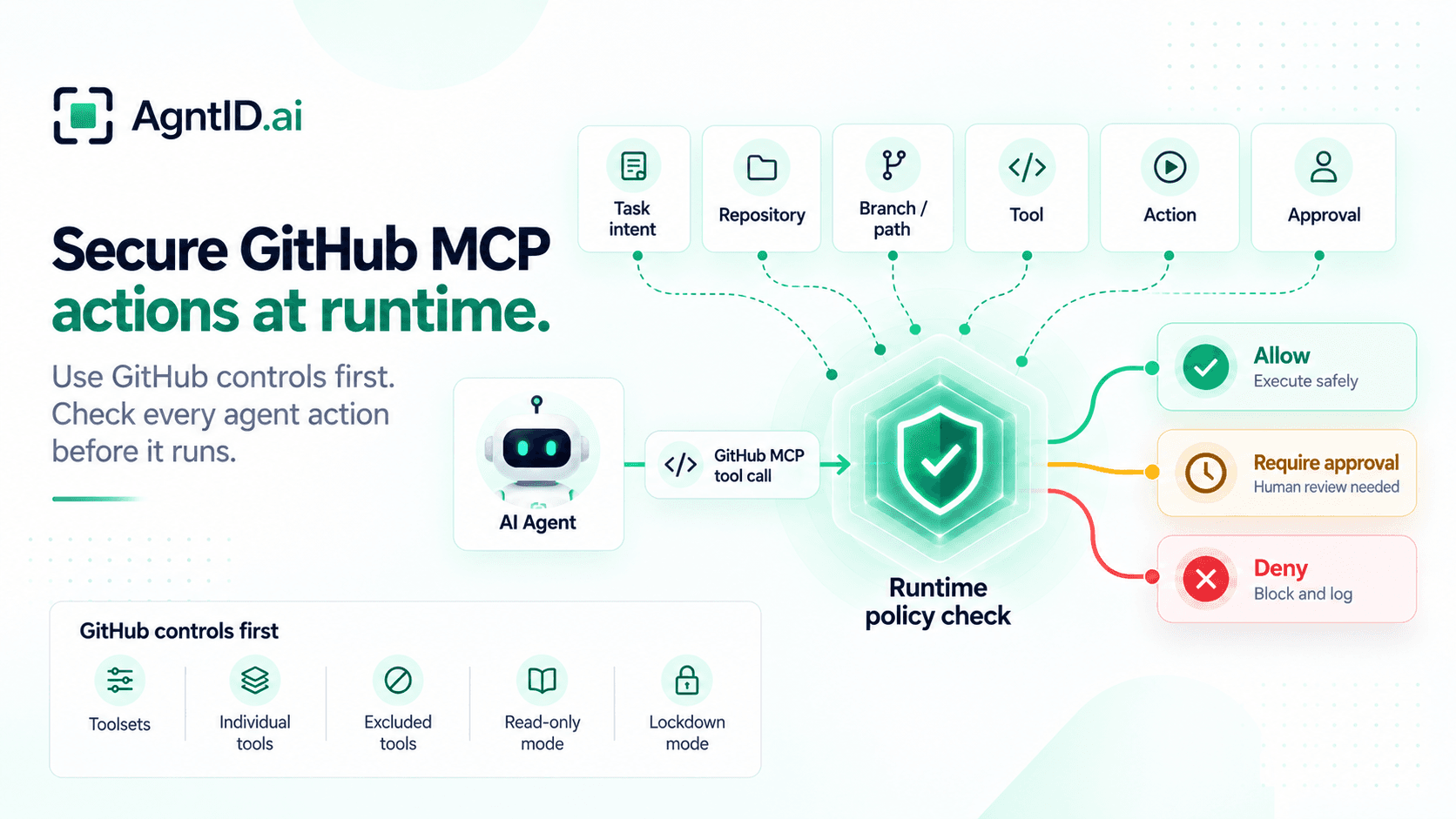
GitHub MCP Security Guide: Securing Agent Actions, Permissions, and Runtime Access
An engineering team gives an AI agent access to GitHub. The first job is simple: review an open bug, inspect the relevant code, and suggest a fix. The agent reads the issue, searches the repository, checks an earlier pull request, and decides the fix is straightforward.
What happens next depends on the access behind the agent. Can it create a branch? Modify files? Open a pull request? Change a GitHub Actions workflow? Run that workflow? Merge the PR? Each action may be valid in the right workflow. Each action also carries a different level of risk.
GitHub already lets teams control who can access a repository, what a credential can do, which branches are protected, and what must happen before code can be merged. The GitHub MCP server adds another control point by letting teams configure toolsets, select individual tools, exclude tools, enable read-only mode, and use lockdown mode for some public-repository content risks. Those controls are necessary and should be used first. The remaining question appears at runtime: should this specific agent action run for the task in front of it?
What GitHub MCP Enables
GitHub MCP gives AI agents a structured way to work with GitHub through tools. Depending on the configuration, an agent may be able to search repositories, read files, inspect issues, inspect pull requests, comment on issues or pull requests, create branches, modify files, open pull requests, inspect GitHub Actions runs, trigger or rerun workflows, or merge pull requests.
These actions should not be treated as one broad permission called "GitHub access." Reading issue context is different from changing source code. Changing source code is different from editing .github/workflows/deploy.yml. Opening a pull request is different from merging it.
A secure GitHub MCP setup separates these actions before the agent starts using them. The goal is not to block useful agent work. The goal is to make sure the GitHub action matches the task, the repository, the target object, and the level of consequence.
Start With GitHub’s Built-In Controls
GitHub MCP should not be treated as insecure by default. Teams should first use the controls GitHub already provides: narrow credentials, limit repository access, choose which MCP tools are available, exclude tools the agent should not use, enable read-only mode where possible, use lockdown mode where it applies, protect important branches, and keep repository rules in place.
Those controls define what an agent can access and which tools it can reach. They are necessary for any secure GitHub MCP deployment. The point is not that GitHub MCP is broken. The point is that agent workflows introduce a second question after access has already been configured.
A multi-purpose agent may legitimately have access to several GitHub capabilities, but only some of those capabilities are appropriate for the task it is performing right now. That is a runtime authorization problem, not a claim that GitHub MCP is insecure.
What Agent Access Through GitHub MCP Needs to Control
A useful control model starts with the GitHub object being touched and the consequence of the action. This is where many security reviews should begin, because "read" and "write" are too broad to describe what an AI agent can do through GitHub.
| GitHub MCP action | GitHub object | Risk to control | Suggested control |
|---|---|---|---|
| Search code | Repository | Agent reads sensitive or unrelated code | Restrict repository and task scope |
| Read issue | Issue | Agent reads unrelated issues or private context | Restrict repository and issue context |
| Comment on issue | Issue | Agent posts incorrect or unauthorized content | Restrict target issue and consider approval |
| Read pull request | Pull request | Agent accesses unrelated changes or review context | Restrict repository and PR context |
| Create branch | Git reference | Agent creates branches outside the expected workflow | Restrict branch naming and repository |
| Modify file | Repository contents | Agent changes code outside the task | Restrict branch, path, and action type |
| Delete file | Repository contents | Agent causes destructive repository changes | Deny by default or require approval |
| Open pull request | Pull request | Agent proposes changes outside approved scope | Restrict source branch and target branch |
| Run workflow | GitHub Actions | Agent triggers builds, deployments, or external effects | Restrict workflow, ref, inputs, and approval |
| Modify workflow file | .github/workflows | Agent changes what automation can execute | Treat as high-risk configuration change |
| Merge pull request | Protected branch | Agent moves code into an important branch | Require repository rules and explicit authorization |
This table is the core of the guide. The GitHub credential decides what the agent can do in GitHub. MCP settings decide which tools the agent can reach. Repository rules decide what must happen before important branches or paths can be changed. The next layer checks whether a specific GitHub MCP tool action fits the approved task.
Start With the Credential Behind the Agent
Every GitHub MCP action reaches GitHub through an authenticated account or credential. That access may come from OAuth, a personal access token, a GitHub App, or another supported deployment pattern. The credential matters because it determines what the agent can do in GitHub.
A personal access token may reflect a user-linked credential. A GitHub App can have its own installation, repository selection, and granular permissions. A centrally managed agent is often easier to reason about when it uses an application credential rather than inheriting the broad working context of an individual user.
Start with a simple rule: the credential should not contain authority the agent has no legitimate reason to use. Runtime controls can narrow access further, but they should not be used to justify an overpowered base credential.
Use GitHub Permissions as the Outer Boundary
GitHub permissions define what a credential can access and whether that access is read or write. Fine-grained personal access tokens can restrict repository access and permissions. GitHub Apps can request specific permissions for areas such as Contents, Issues, Pull requests, Actions, and Workflows.
Those distinctions matter for agents. An issue-triage agent may only need issue reads. A pull request review agent may need pull request and contents read access. A coding agent may need Contents write access and Pull requests write access. An agent that investigates failed CI may need to read Actions runs and logs without being allowed to trigger workflows.
Do not collapse these into "GitHub write access." Grant the broad permission set required for the agent's role. Then restrict sensitive actions inside that boundary.
Limit the GitHub MCP Tools the Agent Can See
The GitHub MCP server gives teams a second control point before the model chooses an action. Teams can enable toolsets, select individual tools, exclude tools, and use read-only mode. Read-only mode is especially useful because it removes write-capable tools even when they would otherwise appear through a selected toolset.
Use this aggressively. If an agent only reviews code, do not expose code-writing tools. If an agent opens pull requests but should not merge them, remove merge access. If an agent never needs to run GitHub Actions, do not expose workflow execution tools. If an agent only performs research, triage, or review, start with read-only mode.
Removing unnecessary tools is often stronger than relying on the model not to use them. MCP tool filtering does not solve every case. A multi-purpose coding agent may need write tools for some workflows and read-only access for others. That is where GitHub object boundaries become important.
Control Repository, Branch, Path, Issue, PR, and Workflow Boundaries
"Can write to GitHub" is too broad. Consider a coding agent working on acme/payments-api. The agent may be allowed to read the repository, create branches beginning with agent/, modify files under src/, and open pull requests into develop.
That does not mean the agent should be allowed to modify main, edit .github/workflows/deploy.yml, change infrastructure configuration, delete repository files, touch another repository in the organization, or merge its own pull request. Repository, branch, path, issue, pull request, and workflow are separate boundaries.
GitHub rulesets and branch protections should remain in place. They can require pull requests, status checks, reviews, code-owner approval, and other conditions before changes reach protected branches. An agent should follow the same protected engineering path where appropriate. It should not become a shortcut around GitHub-native controls.
Treat Workflow Changes as Higher Risk Than Normal File Changes
A file write is not always just a file write. Changing src/auth/session.ts and changing .github/workflows/deploy.yml can have different consequences. A source-code change modifies application logic. A workflow change can alter automation that builds, tests, deploys, publishes, or interacts with other systems.
GitHub's permission model reflects this distinction. GitHub Apps that need to access or edit Actions files in .github/workflows should request the Workflows repository permission. Your policy should preserve the same distinction.
A coding task may allow changes under src/auth/** while denying changes to .github/workflows/**, deployment configuration, infrastructure definitions, security policy, dependency files, CODEOWNERS, or repository settings. The exact list should come from the repository's engineering process. The key point is that workflow and configuration changes should not be treated like ordinary source edits.
Classify GitHub Actions by Consequence
A practical GitHub MCP policy can group actions into four classes. Read actions include reading issues, code, commits, pull requests, workflow runs, and logs. These are usually lower risk, but they are not risk-free. Private repositories, security issues, incident threads, and CI logs may contain sensitive information.
Collaborative writes include commenting on issues, updating labels, creating issues, and opening pull requests. These actions change shared state. Code and configuration writes include creating branches, modifying files, deleting files, and changing important repository configuration. Both classes should stay tied to the relevant repository, issue, pull request, branch, file path, and task.
Consequential actions include merging pull requests, editing workflows, triggering workflows with downstream effects, deleting important content, or touching production-connected automation. These actions are strong candidates for approval or stricter policy. The category should follow the effect of the action, not just the API method.
Why Permissions Can Still Be Broader Than the Task
A GitHub token can be scoped correctly and still allow more than the current task requires. A software-engineering agent may handle both investigation and implementation. It needs read access to investigate bugs. It needs write access when the task asks it to implement an approved fix.
In some environments, teams can split those workflows across separate agents or credentials. In others, the same agent handles both. The risk appears when the current task is read-only while the agent still has access to write-capable tools.
AgntID previously tested this pattern in a GitHub MCP experiment. A read-only bug-review task was configured in a way that exposed more GitHub tools than the task required, including write-capable actions. The useful lesson for this guide is not the exact tool count or prompt behavior. It is the gap between available access and task-required access: an agent may have a capability available, but that does not mean the current task should be allowed to use it.
This guide treats that finding as a starting point. The practical question is how to design safer GitHub MCP access: which credentials to use, which tools to expose, which repositories and paths to restrict, when to require approval, and when to narrow access before the tool call runs.
Example: Fix the Bug, But Do Not Change Deployment
Suppose a user asks: "Investigate issue #482, fix the authentication bug, and open a pull request." A reasonable path is to read issue #482, search the relevant authentication code, inspect related commits, create agent/fix-482, modify files under src/auth/, run permitted checks, open a pull request into develop, and stop.
Now assume the issue contains instructions that push the agent toward editing .github/workflows/deploy.yml. Prompt-injection defenses may reduce that risk. GitHub MCP also provides lockdown mode for some untrusted public-repository content scenarios, but GitHub describes lockdown mode as a best-effort content filter rather than an authorization boundary.
The access policy should still hold even when the model proposes the wrong action. For this task, the policy might allow repository acme/payments-api, issue #482, branch creation under agent/*, file writes under src/auth/**, pull request creation, and target branch develop. It might deny writes to .github/workflows/**, writes to main, file deletion, workflow execution, pull request merge, and access to unrelated repositories. The policy does not need to decide whether the agent's reasoning was good. It needs to decide whether the proposed GitHub action fits the approved work.
Build GitHub MCP Policies Around Tasks and Actions
A useful policy starts with the work the agent is supposed to complete. The table below keeps the decision close to the task instead of treating GitHub write access as one broad grant.
| Agent task | Expected GitHub actions | Actions to restrict |
|---|---|---|
| Summarize open bugs | Search and read issues | Issue changes, code writes, PR writes |
| Review a pull request | Read PR, diff, commits, checks | Push, merge, workflow changes |
| Fix an approved bug | Read issue, create branch, modify approved paths, open PR | Protected-branch writes, workflow changes, merge |
| Investigate failed CI | Read workflow runs, jobs, and logs | Rerun, cancel, workflow-file changes |
| Prepare dependency update | Modify dependency files on an agent branch, open PR | Unrelated code changes, merge |
| Run approved maintenance workflow | Trigger named workflow with approved inputs | Other workflows, branches, or arguments |
| Merge approved change | Merge specific PR after required checks | Other PRs or bypass of repository rules |
This shifts the decision from broad access to specific action. Instead of asking whether the agent has GitHub write access, ask whether this task justifies this write, to this target, with these arguments.
Put Approval Gates Around High-Impact Transitions
Approval should protect meaningful changes in consequence. Do not require approval for every GitHub read. That creates noise and trains reviewers to click through low-risk decisions.
Use approval when the agent crosses into a higher-risk action, such as writing to a sensitive path, changing workflow definitions, running a workflow that deploys or publishes, deleting repository content, targeting a protected branch, merging a pull request, moving outside the repository named in the task, or taking an action not covered by the original task.
Approval should be specific. "Allow GitHub write access" is too broad. "Allow the agent to update src/auth/session.ts on agent/fix-482 for issue #482" is reviewable. If the agent later changes the file, repository, branch, workflow, or important arguments, the approval should be reconsidered.
Where AgntID Fits
GitHub authentication, repository permissions, MCP tool settings, branch rules, and code-review requirements should stay in place. They each do useful work. GitHub decides who can access the repository. GitHub permissions decide what the credential can do. MCP settings decide which tools the agent can see. Repository rules decide what must happen before important code changes are merged.
AgntID does not replace GitHub authentication, GitHub permissions, MCP tool settings, branch protection, or repository rules. It adds runtime authorization for the moment when an agent is about to use one of those permitted capabilities. Before a GitHub MCP tool call executes, AgntID can evaluate the task, policy, tool, resource, arguments, approval state, and credential context. Policy can then allow the action, deny it, require approval, or narrow the credential for that specific action.
This matters because AI agents do not act like normal software services. An agent may reason through a task, choose a tool dynamically, and attempt a GitHub action that was not required by the original work. A broad session credential does not express that distinction. AgntID scopes access just for the task, so the agent receives only the permission needed for the action that matches the approved work.
Credential narrowing matters because the agent does not need the full standing authority of the GitHub integration for every tool call. For GitHub MCP, an agent can be allowed to read issue #482, create agent/fix-482, modify files under src/auth/**, and open a pull request without also being allowed to edit .github/workflows/**, delete files, run workflows, or merge code.
GitHub should still decide who can access the repository, what the credential can do, and which repository rules apply. AgntID enforces task-specific authorization before the tool call executes, without replacing GitHub, IAM, or the MCP server.
GitHub MCP Security Checklist
Use this checklist before giving an AI agent GitHub access through MCP.
1. Define the workflow
Write down what the agent should do: triage issues, review PRs, modify code, open PRs, investigate CI, or run workflows.
2. Choose the right identity
Decide whether the agent should use OAuth, a personal access token, a GitHub App, or another supported identity model.
3. Minimize GitHub permissions
Grant only the repository permissions the workflow requires. Separate Issues, Pull requests, Contents, Actions, and Workflows.
4. Limit repository reach
Restrict the credential to the repositories the agent should use.
5. Reduce the MCP tool surface
Enable only the required toolsets or tools. Exclude tools the agent should never use.
6. Use read-only mode where possible
Use read-only mode for research, review, analysis, and triage workflows that do not need writes.
7. Keep repository protections in place
Use rulesets, branch protection, required reviews, required checks, and code-owner rules where appropriate.
8. Protect sensitive paths
Treat workflow files, deployment configuration, infrastructure definitions, security policy, and dependency files separately from ordinary source files.
9. Add task-specific checks
Evaluate repository, branch, path, tool, arguments, and task before sensitive actions run.
10. Require approval for high-impact actions
Use approval for merges, workflow changes, destructive operations, production-impacting automation, or movement outside the original task.
11. Log the decision
Record the agent, task, tool, target GitHub object, policy decision, approval state, and final action.
Frequently Asked Questions
What is GitHub MCP?
GitHub MCP lets AI agents interact with GitHub through structured tools for repositories, issues, pull requests, files, and GitHub Actions.
How does GitHub MCP authentication work?
GitHub MCP uses an authenticated GitHub identity, such as OAuth or an access token. The credential determines which GitHub resources and permissions are available to the agent.
What permissions should a GitHub MCP token have?
A GitHub MCP token should have only the repository access and permissions required for the agent's task. Avoid broad write permissions when the agent only needs read access or a limited set of actions.
Can GitHub MCP be read-only?
Yes. GitHub MCP supports read-only mode, which removes write-capable tools from the agent's available toolset.
Can you restrict which GitHub MCP tools an agent can use?
Yes. GitHub MCP lets you enable specific toolsets or individual tools and exclude tools the agent should not use.
Is GitHub MCP secure?
GitHub MCP can be secured by narrowing the credential, limiting repositories, exposing only the tools the agent needs, using read-only mode, and keeping repository rules in place. The risk depends on whether the agent's available tools and credentials match the task it is performing.
Should AI agents use a GitHub App or personal access token?
Both can work. GitHub Apps are useful for centrally managed integrations, while fine-grained personal access tokens can restrict repository access and permissions for user-linked workflows.
Can an AI agent merge pull requests through GitHub MCP?
Yes, if the merge tool is available, the GitHub credential has permission, and repository rules allow it. High-impact merge actions should have stricter controls or approval.
How do you secure GitHub Actions access for AI agents?
Restrict which workflows an agent can access or trigger. Check the target branch, workflow inputs, and downstream impact before allowing execution.
How do you apply least privilege to GitHub MCP?
Limit the GitHub credential, repositories, MCP tools, branches, and file paths available to the agent. For sensitive actions, also check whether the action is required for the current task.
How does AgntID work with GitHub MCP?
AgntID evaluates GitHub MCP actions before they execute. It can use the task, tool, resource, and arguments to allow, deny, require approval, or narrow credentials for a specific action.
Further Reading
- MCP Security Best Practices — Apply the foundational controls for authentication, tool exposure, and production MCP security.
- Least Privilege for AI Agents — Reduce the authority and blast radius of GitHub agent actions.
- Runtime Access Control for AI Agents — Evaluate repository, branch, path, tool, and task context before execution.
- MCP Security Audit — Review credentials, exposed tools, identity-specific access, and runtime tests.