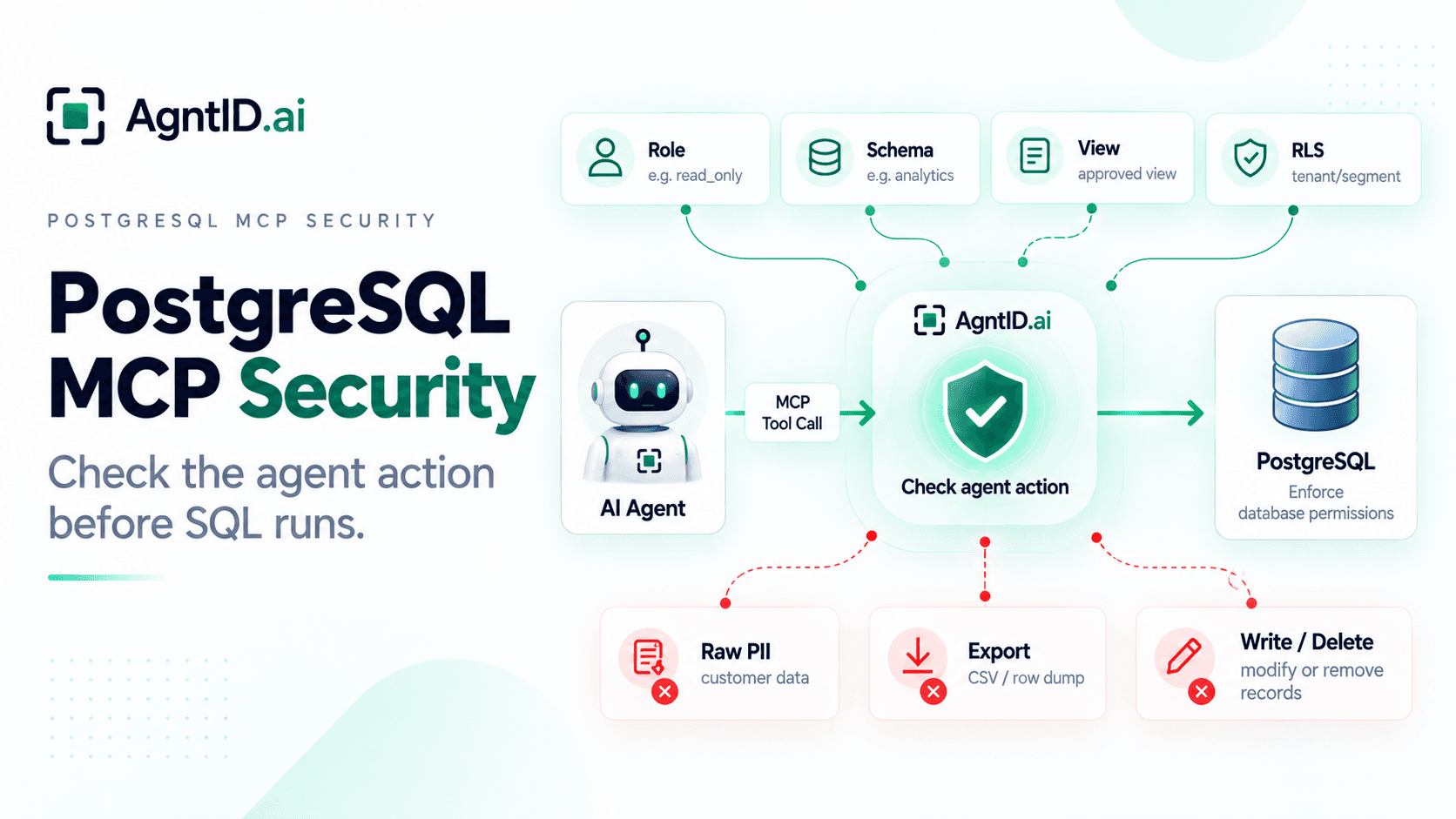
PostgreSQL MCP Security: Database Permissions and Agent Access Control
A customer success team connects an AI agent to PostgreSQL. The first task is simple. The team wants the agent to analyze churn risk for enterprise accounts. The agent needs to inspect a few analytics tables, compare usage patterns, summarize account health, and explain which customers may need attention.
That workflow sounds safe because it starts as analysis. It is still database access. The same agent may discover tables with customer records, billing data, support history, product usage, internal notes, and account status. If the PostgreSQL MCP server uses a broad database role, the agent may be able to query far more than the churn workflow needs. If write access is enabled, the agent may also update account records, delete rows, or change operational state.
PostgreSQL controls what the database role can access. It defines users, roles, schemas, table grants, views, row-level security, replicas, and logs. Those controls should come first. The core PostgreSQL MCP security question comes after that: should this specific agent get scoped access to run this SQL action, against this database object, with these parameters, for this task?
That is the control boundary this guide focuses on.
PostgreSQL MCP Security Decision Matrix
| Agent action | PostgreSQL object | Default posture | Why it matters |
|---|---|---|---|
| Inspect schema | Approved schema only | Allow with limits | The agent needs structure, but broad discovery can expose sensitive tables. |
SELECT analytics data | Approved views or tables | Allow | This is the core read use case. |
SELECT raw PII | Customer, user, payment, or ticket tables | Deny by default | Read-only access can still leak sensitive data. |
| Export query results | Customer, finance, support, or usage datasets | Require approval | Export turns a query into a data movement event. |
INSERT notes | Narrow table or controlled function | Allow with validation | The agent writes only to a safe destination. |
UPDATE records | Production tables | Deny or require approval | The agent can change business state. |
DELETE rows | Production tables | Deny by default | The agent can remove records. |
TRUNCATE, DROP, ALTER | Any production object | Deny | These actions are destructive or structural. |
GRANT or REVOKE | Roles or privileges | Deny | The agent should not change its own authority. |
This matrix should exist before a PostgreSQL MCP server reaches production. It makes the access boundary explicit before the agent is connected to real data.
Do not wait for a prompt injection test to discover that an agent can query raw customer data, export rows, or modify production records. The policy should already define which database objects and SQL actions are allowed, denied, or routed for approval.
What PostgreSQL MCP Enables
A PostgreSQL MCP server gives an AI agent a way to interact with a PostgreSQL database through tools. Depending on the implementation, the server may expose tools to inspect schemas, list tables, run SQL queries, summarize records, generate reports, or modify database rows.
That makes PostgreSQL MCP useful for internal analytics and operational workflows. A product manager can ask which accounts had a drop in weekly active users. A support lead can ask for a summary of open issues for enterprise customers. A finance analyst can ask for unpaid invoices by region. An engineering manager can ask which jobs failed in the last 24 hours.
SQL is not the risk by itself. The risk is the data and authority available through the SQL connection. A Slack agent may read messages. A GitHub agent may inspect code. A PostgreSQL agent can query structured records that define how the business runs: customers, invoices, subscriptions, usage events, support tickets, internal analytics, and operational state.
That makes database permissions the starting point.
What Can Go Wrong
A PostgreSQL MCP agent needs clear database rules and clear agent-action rules. The most common failure modes are not abstract agent risks. They are database risks.
A churn-analysis request can turn into a query against customer names, emails, phone numbers, billing addresses, or support ticket text. A reporting request can become a CSV export, a raw row dump, or a full list of high-risk accounts with contact details.
A summary workflow can also become an action workflow. The agent may mark accounts as high risk, change owner fields, update billing state, or edit customer attributes. A cleanup request can become DELETE, TRUNCATE, DROP, ALTER, or a stored procedure call that changes production state.
The controls need to map to database objects and SQL actions. It is not enough to say the agent has database access. The policy needs to define which schemas, tables, views, rows, columns, and SQL actions are allowed for the task.
Create a Dedicated Database Role for the Agent
The first PostgreSQL MCP security decision is the database role. Do not connect the MCP server using a superuser, database owner, migration user, or application user. Those roles usually carry more authority than an agent needs.
Create a dedicated PostgreSQL role for each agent workflow. For example:
CREATE ROLE churn_analysis_agent LOGIN PASSWORD '...';

GRANT CONNECT ON DATABASE app_prod TO churn_analysis_agent;
GRANT USAGE ON SCHEMA agent_safe TO churn_analysis_agent;
GRANT SELECT ON agent_safe.churn_analysis TO churn_analysis_agent;
GRANT SELECT ON agent_safe.account_usage_summary TO churn_analysis_agent;
GRANT SELECT ON agent_safe.support_summary TO churn_analysis_agent;
This role can connect. It can use the agent_safe schema. It can query the approved views. It cannot update customer records. It cannot inspect every raw table. It cannot delete data. That is the right starting point.
Avoid sharing the same PostgreSQL role across multiple AI agents. Separate roles make permission reviews, audit trails, and incident investigations easier. If the workflow is churn analysis, the role should not have access to payment methods, raw support messages, authentication tables, or admin tables.
PostgreSQL supports privileges such as SELECT, INSERT, UPDATE, DELETE, TRUNCATE, CONNECT, EXECUTE, and USAGE. The privileges available depend on the type of database object, such as a table, schema, function, or database. The agent role should receive only the privileges required for the workflow.
Use Schemas as Agent Boundaries
Schemas are useful security boundaries when they are designed intentionally. A common pattern is to keep raw application tables in one schema and agent-approved views in another schema.
app.customers
app.invoices
app.payment_methods
app.support_tickets
app.usage_events

agent_safe.churn_analysis
agent_safe.account_usage_summary
agent_safe.support_summary
The agent role should not receive USAGE on every schema. It should receive USAGE only on the schema that contains approved objects. This makes access easier to review.
If a security lead asks what the churn-analysis agent can query, the answer should be visible inside one agent-safe schema. The answer should not require searching through every production table. Schemas also reduce accidental discovery because a schema inspection tool should not show the agent every table in the database if the task only needs a curated analytics surface.
Prefer Views Over Raw Tables
Views are one of the cleanest ways to expose PostgreSQL data to agents. Think of a view as the contract between the database and the agent. The agent should query that contract instead of discovering and joining raw production tables.
A view can include approved columns. It can join the tables needed for analysis. It can remove PII. It can rename fields into safer business terms. It can hide internal implementation details that the agent does not need.
A raw customer table may contain:
customer_id
customer_name
email
phone
billing_address
payment_status
plan
renewal_date
churn_score
internal_notes
The agent-safe view may expose only:
account_id
plan
renewal_date
churn_score
usage_drop_percent
support_ticket_count
last_active_date
That view is enough for churn analysis. It does not expose email, phone number, billing address, payment metadata, or internal notes. Do not assume a view is safe because it is a view. Grant only the permissions the agent needs. In most cases, the agent should receive SELECT on the view and no write privileges.
Use Row-Level Security for Tenant and Segment Boundaries
Row-level security matters when an agent should see some rows but not others. PostgreSQL row-level security can restrict which rows are returned or modified by SELECT, INSERT, UPDATE, and DELETE. When row-level security is enabled and no applicable policy exists, PostgreSQL applies default deny.
That makes row-level security useful for agents that should only access one tenant, region, workspace, customer segment, environment, or business unit. For the churn-analysis agent, the policy may allow only enterprise accounts:
ALTER TABLE analytics.account_health ENABLE ROW LEVEL SECURITY;

CREATE POLICY enterprise_churn_read
ON analytics.account_health
FOR SELECT
TO churn_analysis_agent
USING (segment = 'enterprise');
This policy limits the agent role to enterprise account rows. Even if the agent generates a broader query, PostgreSQL evaluates the applicable row security policies before returning rows.
Row-level security is not a replacement for table and schema permissions. Use grants to decide which objects the role can touch. Use row-level security to decide which rows inside those objects are visible or modifiable.
Read-Only Does Not Mean Low-Risk
Read-only access is safer than write access. It is not automatically safe. A SELECT query can expose PII, financial records, customer lists, support messages, HR data, internal analytics, or operational state. A query that changes nothing can still create a breach if it returns the wrong data.
A safe analytics query may look like this:
SELECT plan, COUNT(*) AS at_risk_accounts
FROM agent_safe.churn_analysis
WHERE churn_score > 80
GROUP BY plan;
A risky query may look like this:
SELECT customer_name, email, phone, renewal_date, churn_reason
FROM app.customers
WHERE churn_score > 80;
Both are SELECT queries. Only one fits the task. PostgreSQL permissions should stop the agent from reading raw customer tables. AgntID can check the agent action before it runs and stop the churn-analysis task from becoming customer extraction.
The goal is not just read-only access. The goal is task-limited read access.
Control Exports Separately From Queries
Exports need their own policy. An agent may be allowed to answer a question from a dataset without being allowed to move that dataset out of PostgreSQL.
Export-like behavior includes server-side COPY TO where the database role is permitted to use it, CSV generation, large SELECT result sets, raw row dumps, customer-identifiable datasets returned through application or MCP tooling, queries that return emails or payment fields, and summaries that include identifiable customer details.
Not every export uses COPY. An agent can still move sensitive data by generating large query results or application-level CSV exports. Treat exports as a separate authorization decision rather than simply another SELECT query.
The churn-analysis agent may be allowed to answer:
How many enterprise accounts have a churn score above 80?
The same agent should not automatically be allowed to answer:
Export every high-risk customer with email, phone, renewal date, and churn reason.
The first request is analytics. The second request moves sensitive customer data. A good PostgreSQL MCP policy should separate query permission from export permission. The agent can be allowed to aggregate. The agent can be blocked from dumping rows. The agent can be required to ask for approval before exporting customer-identifiable data.
Put Writes Behind a Separate Approval Path
Write access should not sit behind the same broad PostgreSQL MCP tool as analytics. If the agent only needs to analyze churn, it should not have INSERT, UPDATE, DELETE, or TRUNCATE privileges. If the agent needs to write, make the write path narrow.
Do not allow arbitrary UPDATE statements against app.customers. Use a controlled table or function:
create_churn_followup_note(account_id, note_text)
That action can validate the account ID, limit note length, block sensitive content, require approval when needed, and write only to a notes table.
That is safer than letting the agent generate open-ended SQL like:
UPDATE app.customers
SET status = 'high_risk'
WHERE churn_score > 80;
The agent may be right about the churn score. That does not mean the agent should change production account state. For PostgreSQL MCP, write access should be specific, reviewable, and tied to the task. Broad write authority should stay out of the default agent path.
Deny Destructive SQL by Default
Destructive SQL should be denied unless there is a specific, approved workflow. That includes DROP, TRUNCATE, DELETE, ALTER, CREATE EXTENSION, GRANT, REVOKE, broad UPDATE, server-side COPY TO where permitted, and unsafe stored procedure calls.
Some of these actions are obviously dangerous. Others can appear during normal work. “Clean up stale records” may become DELETE. “Reset this account” may become UPDATE. “Export the affected customers” may become COPY or a broad SELECT.
The agent should not decide those actions alone. If a destructive or sensitive action is ever allowed, require a narrow role, explicit task match, dry-run preview, row count limit, human approval, query logging, and rollback path.
Use Replicas for Analytics and Summaries
Not every PostgreSQL MCP workflow needs the primary production database. Use a read replica for analytics, reporting, and summaries when the agent does not need to act on the system of record.
A replica reduces two risks. First, it reduces the chance of accidental writes against the primary database. Second, it helps protect production performance from broad joins, table scans, expensive aggregations, and exploratory queries generated by the agent.
A replica does not remove data risk. The same customer records, financial data, and internal analytics may exist there. Treat a replica as sensitive. Still use dedicated roles, approved schemas, views, row limits, row-level security, and logs.
The benefit is blast-radius reduction. The agent can answer business questions without direct write access to the primary production database.
Log Queries and Agent Actions
Every PostgreSQL MCP query should be attributable. You should be able to answer which user made the request, which agent handled it, which prompt or request ID triggered it, which MCP tool was called, which database role was used, which SQL action was generated, which schema, table, view, and columns were touched, how many rows were returned, whether the action was allowed or denied, and which approval ID allowed the action if approval was required.
PostgreSQL logs can show what reached the database when statement logging is enabled. Agent-action logs complement database logs by explaining why the agent attempted the action and whether the request was allowed, denied, or routed for approval.
Both matter. Do not log sensitive result data unless there is a strong reason. Query text, parameters, and result samples may contain secrets or personal data. Keep logs useful for audit without turning logs into another sensitive database.
Runtime Policy Scenario: Churn Analysis Agent
Consider the churn-analysis agent again. The approved task is:
Analyze churn risk for enterprise accounts using approved analytics data.
The PostgreSQL role is:
churn_analysis_agent
The role can read:
agent_safe.churn_analysis
agent_safe.account_usage_summary
agent_safe.support_summary
The role cannot read:
app.customers
app.users
app.payment_methods
app.invoices
app.support_ticket_raw
The allowed SQL actions are:
SELECT from approved views
Aggregations over approved views
Limited joins between approved views
The denied SQL actions are:
INSERT
UPDATE
DELETE
TRUNCATE
DROP
ALTER
COPY TO
GRANT
REVOKE
SELECT from raw PII tables
The user asks:
Show enterprise accounts with churn score above 80 and summarize the top three drivers.
The agent generates a SELECT query against agent_safe.churn_analysis and agent_safe.account_usage_summary. The query returns account IDs, plan, churn score, and approved usage signals. The action matches the task. The query targets approved views. The policy allows it.
Then the user asks:
Update those accounts to high-risk and export the customer list with emails.
The policy denies it. The denial is specific. The task is churn analysis. The proposed SQL includes UPDATE and export behavior. The requested data includes emails. The target data falls outside the approved views. PostgreSQL permissions should block raw table access. AgntID should block the action before execution.
This is the right control model. PostgreSQL defines what the database role can access. AgntID checks whether the agent’s specific action fits the task, SQL action, database object, parameters, and approval boundary before the SQL runs.
Where AgntID Fits
PostgreSQL controls what the database role can access. It defines users, roles, privileges, schemas, tables, views, row policies, replicas, and logs.
AgntID checks each PostgreSQL MCP tool call before it runs. For PostgreSQL MCP, AgntID can evaluate the task, SQL action, target schema, target table or view, requested columns, export behavior, row count risk, and approval state.
Access does not need to stay broad for the full session. For a churn-analysis task, the agent can be scoped to approved views and SELECT actions. Raw PII queries, exports, writes, and destructive SQL can be denied or routed for approval.
AgntID does not replace PostgreSQL permissions. PostgreSQL should still enforce least privilege at the database layer. AgntID checks whether the agent should use that access for the task it is performing.
PostgreSQL MCP Security Checklist
- Create a dedicated PostgreSQL role for each agent workflow.
- Do not use superuser, owner, migration, or application roles for MCP.
- Avoid sharing the same PostgreSQL role across multiple AI agents.
- Grant
CONNECTonly to the required database. - Grant
USAGEonly on approved schemas. - Prefer agent-safe views over raw production tables.
- Grant
SELECTonly on approved objects. - Remove PII columns from agent-facing views unless required.
- Use row-level security for tenant, region, segment, workspace, or environment boundaries.
- Treat exports as separate from ordinary queries.
- Require approval for large row dumps, CSV generation, and customer-identifiable exports.
- Keep write privileges out of the default MCP path.
- Use controlled tools or functions for narrow write workflows.
- Deny
DROP,TRUNCATE,ALTER, broadDELETE, broadUPDATE, export-like access,GRANT, andREVOKEby default. - Use read replicas for analytics and summaries where possible.
- Set statement timeouts and row limits.
- Log SQL actions and agent-action allow or deny decisions.
- Require approval for writes, exports, privilege changes, and destructive SQL.
- Review grants, views, policies, and logs regularly.
Frequently Asked Questions
What is PostgreSQL MCP?
PostgreSQL MCP lets an AI agent connect to PostgreSQL through an MCP server. The agent can inspect schemas, query tables, summarize records, and sometimes modify data.
What is PostgreSQL MCP security?
PostgreSQL MCP security controls what an AI agent can do inside a PostgreSQL database. It covers roles, schemas, table grants, views, row-level security, read-only access, exports, writes, and query logs.
Is a PostgreSQL MCP server safe for production?
A PostgreSQL MCP server can be used with production only when access is tightly scoped. Use a dedicated role, approved views, row limits, logs, and deny rules for writes, exports, and destructive SQL.
Should a PostgreSQL MCP agent use a read-only user?
Yes. Start with a dedicated read-only PostgreSQL role that has CONNECT, USAGE on approved schemas, and SELECT only on approved tables or views.
Is read-only PostgreSQL access enough for AI agents?
No. Read-only access can still expose PII, customer data, financial records, support messages, or internal analytics through SELECT queries.
Should agents query raw PostgreSQL tables?
Usually no. Use approved views instead of raw production tables so the agent sees only the columns and rows needed for the task.
How does PostgreSQL row-level security help AI agents?
PostgreSQL row-level security limits which rows an agent role can select, insert, update, or delete. Use it for tenant, workspace, region, segment, or environment boundaries.
What PostgreSQL permissions should an AI agent have?
Most agents only need CONNECT on the database, USAGE on one approved schema, and SELECT on approved views. Avoid INSERT, UPDATE, DELETE, TRUNCATE, ALTER, GRANT, REVOKE, and export-like access unless the workflow requires them.
What SQL actions should be denied by default?
Deny DROP, TRUNCATE, ALTER, broad UPDATE, broad DELETE, GRANT, REVOKE, raw PII access, unrestricted exports, and access to unapproved schemas or tables.
How should PostgreSQL MCP handle exports?
Treat exports as a separate permission. CSV generation, large SELECT results, server-side COPY where permitted, and customer-identifiable row dumps should require stricter policy and approval.
Should PostgreSQL MCP use a read replica?
Use a read replica for analytics, reporting, and summaries when the agent does not need to change production data. A replica reduces risk to the primary database but still needs strict access controls.
Where does AgntID fit with PostgreSQL MCP?
PostgreSQL enforces database permissions. AgntID checks each PostgreSQL MCP tool call before execution, including the task, SQL action, target object, export behavior, and approval state.
What is the safest first PostgreSQL MCP setup?
Start with one agent, one read-only role, one agent-safe schema, approved views, row limits, query logs, export controls, and deny rules for writes, PII access, and destructive SQL.
Further Reading
- MCP Security Best Practices — Apply foundational controls for authentication, tool exposure, credential handling, and production MCP security.
- Least Privilege for AI Agents — Reduce database authority and the blast radius of agent queries.
- Runtime Access Control for AI Agents — Evaluate SQL actions, target objects, exports, and task context before execution.
- MCP Security Audit — Review credentials, exposed tools, runtime decisions, and audit evidence.