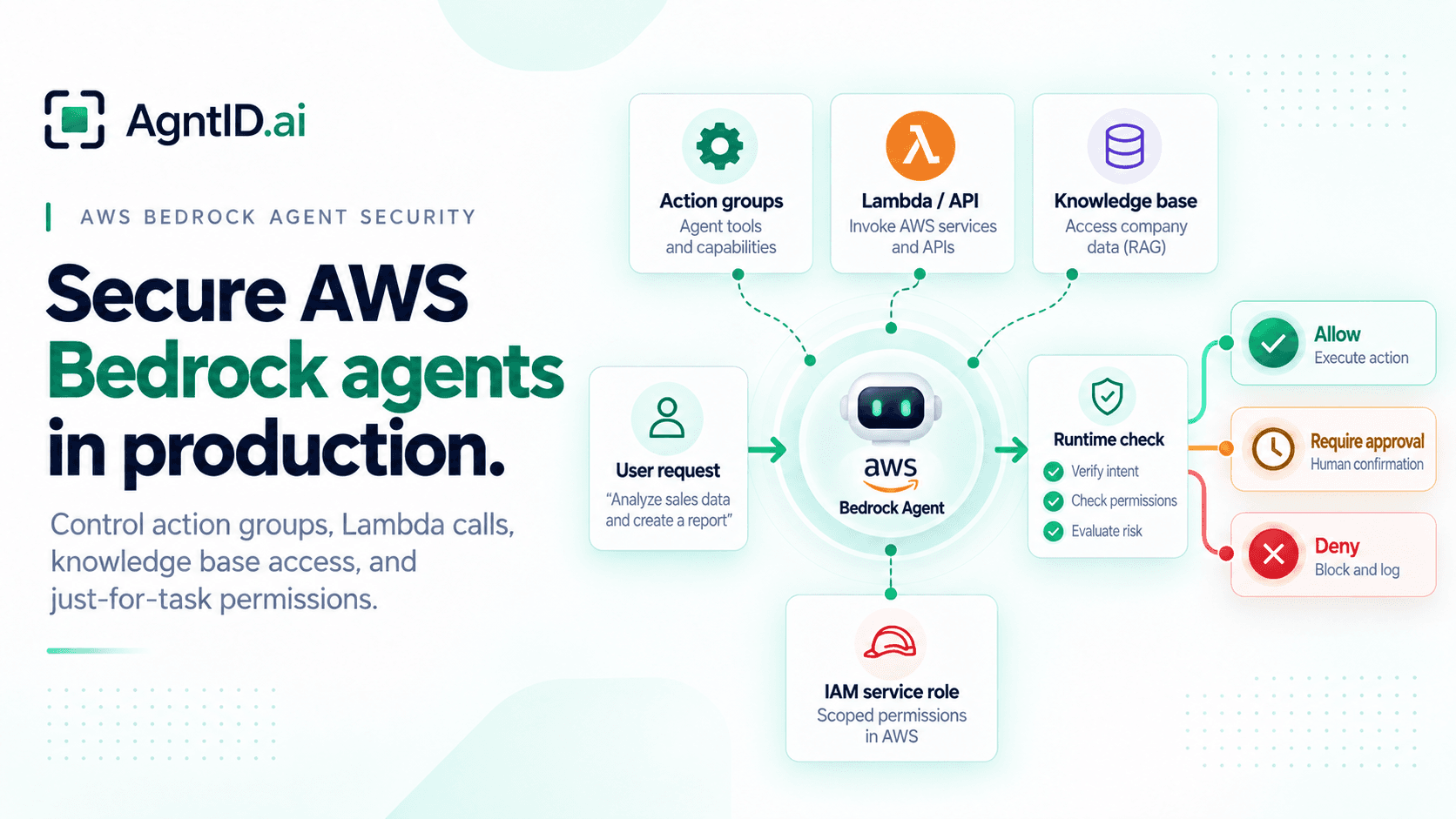
AWS Bedrock Agent Security: How to Secure Action Groups, IAM Roles, and Knowledge Bases
A customer operations team builds an AWS Bedrock agent to help account managers prepare renewal briefs. The agent can read account notes from a knowledge base, call an action group to retrieve open support cases, and invoke a Lambda function that checks contract status. The first version looks safe because the agent mostly summarizes information.
Then the workflow expands. The agent can create renewal tasks, update CRM fields, send Slack notifications, and trigger an escalation when an account looks risky. The same agent now retrieves enterprise data and performs business actions.
The security question changes. It is no longer only, "Can this Bedrock agent call this Lambda function?" The better question is: should this agent take this action, with these parameters, for this user, in this task?
AWS gives teams the pieces to build and run Bedrock agents: action groups, Lambda functions, OpenAPI schemas, IAM service roles, knowledge bases, user confirmation, trace, CloudWatch metrics, and CloudTrail logs. The production challenge is access design. Teams need to decide what the agent can invoke, what permissions back those actions, what data the agent can retrieve, and whether each action should receive just-for-task access at runtime.
This guide focuses on securing Bedrock agents in production. AWS MCP is covered only in a short comparison section because MCP servers, MCP tools, and MCP setup are a separate security topic.
Note on Bedrock Agents Classic
AWS now refers to Amazon Bedrock Agents as Amazon Bedrock Agents Classic. AWS says the service is no longer open to new customers as of July 30, 2026, while existing customers can continue using it. AWS points teams building new agent use cases toward Amazon Bedrock AgentCore.
This guide is written for teams already running Bedrock agents and for teams applying the same access-design pattern to newer AWS agent architectures. The point is not migration. The point is how to design access when an agent can retrieve data, choose actions, and call business systems.
What AWS Bedrock agents can do
AWS Bedrock agents can process user requests, reason over next steps, call action groups, query knowledge bases, and return responses. Action groups define the actions the agent can help users perform, with actions described through OpenAPI schemas or function details.
A Bedrock agent can retrieve data, choose an action, pass parameters, and call code that touches downstream systems. That makes access design important before the agent is connected to enterprise data or business workflows.
| Bedrock surface | What it controls | Security question |
|---|---|---|
| Agent instructions | What the agent is supposed to do | Is the task scope narrow enough? |
| Action groups | What actions the agent can call | Are read, write, and sensitive actions separated? |
| OpenAPI schema or function details | What parameters the agent can collect | Are parameters constrained and validated? |
| Lambda function | Business logic behind the action | Does the function re-check authorization? |
| IAM service role | AWS resources the agent can access | Is the role scoped to the agent's real needs? |
| Knowledge bases | Data the agent can retrieve | Is retrieval limited by sensitivity, user, tenant, and purpose? |
| User confirmation | Whether the user must confirm an action | Is confirmation tied to the exact action and parameters? |
| Trace and logs | What the agent did | Can security teams reconstruct the decision path? |
The access design should cover all of these surfaces. AWS controls define what the Bedrock agent can access and call. IAM controls which AWS resources the agent can access. Action groups define available actions. Lambda and application code enforce business logic. Runtime authorization decides whether the selected action should run for this user, task, resource, and parameter set.
Bedrock agent risk matrix
Not every Bedrock agent action carries the same risk. A production design should classify actions before connecting the agent to business systems. This helps teams avoid treating a routine lookup and a sensitive business update as the same type of access.
| Action category | Example | Risk | Bedrock area to review | Default control |
|---|---|---|---|---|
| Routine read | Retrieve product docs or support status | Low | Knowledge base or read-only action group | Allow within role and task scope |
| Sensitive read | Retrieve contracts, account notes, or internal runbooks | Medium | Knowledge base and Lambda | Limit by user, tenant, resource, and purpose |
| Routine write | Create a follow-up task or draft a note | Medium | Action group and Lambda | Validate parameters and log the action |
| External action | Send an email, Slack message, or customer update | Medium to high | Action group, Lambda, and confirmation | Require task fit and approval for sensitive cases |
| Business state change | Change renewal status, refund amount, or entitlement | High | Action group and Lambda | Runtime authorization and approval |
| Security or infrastructure action | Rotate credentials, change access, or trigger rollback | Critical | Isolated action group and scoped role | Deny by default unless policy allows it |
| Data export | Export records or send files externally | Critical | Knowledge base, Lambda, and external destination control | Deny by default unless narrowly approved |
The goal is not to block useful workflows. The goal is to prevent broad agent access from becoming broad business authority.
Action groups show what the agent can do
Action groups define what a Bedrock agent can do. The agent uses the OpenAPI schema or function details to determine the action it should invoke and the parameters required for the request. Those details are then sent through Lambda or returned to the application, depending on how the action group is configured.
That makes the action group the first place security teams should review what the agent can do. A weak design puts many actions in one action group because they belong to the same workflow. A better design separates actions by consequence. For example, a renewal agent may need to retrieve account summary, retrieve contract status, create a renewal task, update renewal stage, send a customer follow-up, and escalate account risk.
These actions should not receive the same policy treatment. The first two are read actions. The next two change internal state. The fifth sends an external message. The last one may trigger a management workflow. Use separate action groups when the risk changes.
Lambda and API access is where actions become real
Lambda is where a Bedrock action becomes business execution. When a Bedrock agent determines the API operation it needs to invoke, Bedrock sends information from the API schema and relevant metadata to the Lambda function. The input can include the action group, API path, HTTP method, parameters, request body, session attributes, and prompt session attributes.
That input should be treated as an agent-selected request, not as a trusted command. The Lambda function is where many teams can add their own checks. It should validate the action group, API path, method, parameters, user context, tenant, resource, task, and downstream authorization before touching another system.
The Lambda function should also reject valid-looking requests that do not fit the task. A support agent may retrieve an order, but it should not retrieve another tenant's order. A finance agent may create a refund request, but it should not issue a large refund without approval. An IT agent may reset access, but it should not grant admin access because a user asked in natural language.
The OpenAPI schema helps the agent understand how to call an action. It does not replace authorization. AWS notes that Bedrock agents support a subset of OpenAPI 3.0 and do not support the enum field for restricting parameter values to a fixed set. If teams need to constrain values, AWS says they should describe allowed values in the parameter description.
Return control vs Lambda fulfillment
Bedrock action groups can fulfill an action through Lambda. They can also return control to the application after the agent identifies the action and parameters.
If an action group is configured to return control, Bedrock returns the API or function details and parameters in the InvokeAgent response instead of sending them to Lambda. The response includes invocation details and an invocationId, which the application can use to run the action and send results back to the agent.
This matters for access design because the validation point changes. If Lambda fulfills the action, validation belongs inside the Lambda function before it calls the downstream system. If control is returned to the application, validation belongs in the application layer before the application executes the action.
The location changes. The requirement does not. The system still needs to ask whether this action should run now, for this user, task, resource, and parameter set.
IAM service roles control AWS access
Every Bedrock agent needs an IAM service role. That role controls which AWS resources the agent can access. A custom service role for Bedrock agents can include permissions for base models, S3 objects that contain OpenAPI schemas, knowledge bases attached to agents, and optional features such as guardrails, collaborator agents, provisioned throughput, encryption, and code interpretation.
Lambda functions used by action groups also need a resource-based policy that allows the Bedrock service role to invoke them. A production agent should not share a broad Bedrock role with unrelated agents. Use a role that matches the agent's job, and scope model access, schema access, knowledge base access, and Lambda invocation to the smallest useful set.
Also review the trust policy. AWS recommends using condition keys and replacing broad * values with specific agent IDs after the agent has been created. A practical pattern is simple: the service role can invoke only required models, read only the schema files for that agent, query only attached knowledge bases, and invoke only the Lambda functions needed by that agent. IAM is necessary for AWS resource access. It does not decide whether a specific business action should run for the current task.
Knowledge bases are enterprise data access
Knowledge bases are easy to under-review because they feel like context. In Bedrock, a knowledge base can be associated with an agent so the agent can retrieve extra context during orchestration. The agent may use retrieved content to answer the user, choose a next step, or decide which action group to call.
That makes a knowledge base an access path into enterprise data. Securing Bedrock knowledge bases means controlling both retrieval and how retrieved content can influence later agent actions. The risk depends on what is indexed. Product docs are different from contract terms. Public help content is different from account notes. HR policies are different from employee records. Security runbooks are different from general engineering docs.
Before attaching a knowledge base to a Bedrock agent, ask what data is indexed, which users should retrieve it, which tenants or accounts it can expose, and whether retrieved content can influence actions. The last point matters. Retrieved data does not only shape the answer. It may shape the agent's next action.
User confirmation and approval flows
Bedrock supports confirmation before an action runs. The x-requireConfirmation field can be used in an OpenAPI schema to require user confirmation before an action is invoked. AWS also says confirmation can help safeguard applications from actions caused by malicious prompt injections.
This is useful for consequential actions, but it should not become the entire approval model. A good confirmation or approval step should show the agent, user, action, resource, parameters, risk level, task, and expected downstream effect.
Approval should bind to the exact action the agent is about to take. If the agent changes the parameter, target resource, or destination, the approval should no longer apply. For high-risk actions, user confirmation may not be enough. A manager, system owner, finance approver, or security reviewer may need to approve whether the action should happen.
Bedrock agents and AWS MCP work differently
Bedrock agent access and AWS MCP access work differently. A Bedrock agent uses instructions, action groups, Lambda functions, OpenAPI schemas, IAM service roles, and knowledge bases. The security question is how the agent chooses and executes Bedrock actions.
With MCP, servers expose tools that agents can discover and call. The security question is how those tools are exposed, what credentials back them, and how calls reach AWS or other systems.
There is overlap at the risk level. Both involve AI agents taking actions. But the controls are in different places. Do not turn this page into an AWS MCP guide. For Bedrock agents, the useful focus is action groups, Lambda/API calls, IAM service roles, knowledge bases, confirmation, trace, and runtime authorization.
Why static permissions can be broader than the task
A Bedrock agent may have valid access and still attempt an action that does not fit the current task. Consider a customer success agent. The agent can retrieve account history, create a renewal task, update the renewal stage, and send a follow-up email.
All of these may be valid capabilities. The problem appears when the user asks for one task and the agent attempts another. A user asks, "Summarize the renewal risk for this account." The agent retrieves account notes and support history. That fits. If the agent updates the renewal stage to "at risk," the action may be reasonable in another workflow, but it does not fit a summary task.
The agent had access. The task did not justify every action. This is the production gap. Static permission does not equal task-specific authority.
Runtime authorization for Bedrock agent actions
Runtime authorization evaluates the action at the moment the agent attempts to run it. The missing decision is not whether the Bedrock agent can call Lambda in general. The missing decision is whether this specific agent action should run now, for this user, task, resource, and parameter set.
For a Bedrock agent, the runtime decision should consider the user, task, action group, Lambda function or API target, parameters, resource, retrieved data, risk level, approval requirement, and credential scope. This control is useful because the same action can be safe in one workflow and unsafe in another.
A renewal-stage update may be allowed in an account-management workflow. The same update should be blocked in a read-only summary workflow. Runtime authorization helps move agent access from standing permission to task-specific authority. For sensitive actions, this should include credential narrowing so the agent receives only the permission needed for that action, not broad access for the whole session.
Audit and monitoring for Bedrock agents
Production Bedrock agents need audit records that explain what happened, not only whether an API call succeeded. AWS provides CloudWatch metrics for Bedrock agents, including invocation count, processing time, throttles, server errors, client errors, model latency, model invocation count, and token counts. The CloudWatch namespace is AWS/Bedrock/Agents.
AWS also supports trace. To view trace through the API, teams can send an InvokeAgent request and set enableTrace to TRUE. AWS says trace is disabled by default. CloudTrail is also part of the audit picture. AWS logs Agents for Amazon Bedrock Runtime API operations, such as InvokeAgent and InvokeInlineAgent, as CloudTrail data events.
These signals are useful, but access audit should connect them to the action decision. A useful Bedrock agent audit record should include the user request, agent ID, session ID, action group, Lambda or API target, parameters, knowledge base queries, retrieved data category, policy decision, approval status, role used, downstream result, and trace reference. A reviewer should be able to answer what the agent tried to do, why it was allowed or denied, and what changed.
AWS Bedrock agent security checklist
1. Define the agent's job
Write down the business workflow. Separate answering, retrieval, internal updates, external messages, and sensitive changes.
2. Classify action groups
Mark each action group as routine read, sensitive read, routine write, external action, business state change, security action, or data export.
3. Separate actions by consequence
Do not put read, write, external, and irreversible actions behind the same control path.
4. Review OpenAPI schemas and function details
Make parameter names, descriptions, and required fields clear. Do not rely on schema descriptions as enforcement.
5. Validate inside Lambda
Check user, tenant, action, resource, parameters, and task before the function touches a downstream system.
6. Review return-control paths
If the agent returns control to the application, enforce the same validation in the application layer before the action runs.
7. Scope the IAM service role
Limit model access, schema access, knowledge base access, and Lambda invocation to the agent's real needs.
8. Review Lambda execution roles
Make sure each Lambda function has only the downstream permissions it needs.
9. Treat knowledge bases as data access
Review what is indexed, who can retrieve it, and whether retrieved data can influence sensitive actions.
10. Use confirmation for consequential actions
Enable confirmation for actions that change state, send data externally, or trigger sensitive workflows.
11. Add runtime authorization
Evaluate the task, action, parameters, resource, policy, and credential scope before the agent action runs.
12. Log the decision
Record the action attempted, the policy result, approval state, and downstream outcome.
13. Review changes when the workflow changes
Review action groups, schemas, Lambda permissions, IAM roles, and knowledge bases whenever the agent workflow changes.
Where AgntID fits
AgntID fits at the point where the agent is about to take an action.
When a Bedrock agent chooses an action group, AgntID evaluates whether the selected action matches the task, user, resource, parameters, and policy before execution. It can allow the action, deny it, require approval, or narrow credentials for that specific call.
This complements AWS IAM. IAM defines what AWS resources can be accessed. AgntID enforces whether this specific agent action should run in the current task context.
The goal is just-for-task access. The agent gets the permission needed for the action in front of it, without receiving broad standing access across the whole session.
AgntID is designed to work with existing IAM, tools, and agent setups. It adds runtime enforcement without requiring teams to rip and replace their access stack.
Frequently asked questions
What is AWS Bedrock agent security?
AWS Bedrock agent security means controlling what a Bedrock agent can retrieve, invoke, and change. It covers action groups, Lambda functions, IAM service roles, knowledge bases, user confirmation, logs, and runtime authorization.
Is Amazon Bedrock Agents still available?
AWS now calls it Amazon Bedrock Agents Classic. It is no longer open to new customers as of July 30, 2026. Existing customers can continue using it, and AWS points teams building new agent use cases toward AgentCore.
What are action groups in AWS Bedrock agents?
Action groups define the actions a Bedrock agent can help users perform. They can connect the agent to APIs, Lambda functions, or application-controlled workflows.
How do Bedrock agents use Lambda functions?
A Bedrock agent can use Lambda to fulfill an action group. After the agent picks an API operation, Bedrock sends schema details and metadata to the Lambda function.
What is the IAM service role for a Bedrock agent?
The IAM service role gives the Bedrock agent access to required AWS resources. This can include models, OpenAPI schemas, knowledge bases, and Lambda functions.
Are IAM roles enough to secure Bedrock agents?
No. IAM roles control AWS resource access. They do not fully decide whether a specific agent action should run for a specific user, task, resource, and parameter set.
How should teams secure Bedrock knowledge bases?
Treat Bedrock knowledge bases as enterprise data access paths. Limit what data is indexed, who can retrieve it, and whether retrieved content can influence agent actions.
What is the biggest security risk with Bedrock agents?
The biggest risk is over-permissioned action execution. A valid action group call can still be unsafe if it does not match the user's task, authority, resource, or business policy.
Should Bedrock agent actions require user confirmation?
Use confirmation for sensitive actions. This includes actions that change state, send data externally, affect money, modify access, or touch production systems.
How are Bedrock agent security and AWS MCP security different?
Bedrock agent security focuses on action groups, Lambda, IAM roles, knowledge bases, confirmation, and trace. MCP security focuses on servers that expose tools to agents. The control points are different.
What should teams log for Bedrock agent actions?
Log the user request, agent ID, session ID, action group, Lambda or API target, parameters, knowledge base retrieval, policy decision, approval status, role used, result, and trace reference.
Where does runtime authorization fit with AWS Bedrock agents?
Runtime authorization fits before the selected action runs. It checks the task, user, action group, parameters, resource, risk level, and approval requirement.
How does AgntID fit with AWS Bedrock agents?
AgntID fits at the point where the Bedrock agent is about to take an action. It checks whether the selected action matches the task, user, resource, parameters, policy, and credential scope before execution.
Does AgntID replace AWS IAM?
No. AgntID complements AWS IAM. IAM controls AWS resource access. AgntID controls whether a specific agent action should run in the current task context and whether credentials should be narrowed for that action.
What is the best way to secure a Bedrock agent in production?
Separate read, write, external, and sensitive actions. Scope the IAM service role. Validate Lambda actions. Treat knowledge bases as data access. Require approval for consequential actions. Add runtime authorization before sensitive actions run.
Further Reading
- MCP Security Best Practices — Apply foundational controls for authentication, tool exposure, credential handling, and production agent security.
- Least Privilege for AI Agents — Reduce standing AWS authority and the blast radius of Bedrock actions.
- Runtime Access Control for AI Agents — Evaluate user, task, resource, parameters, risk, and approval before execution.
- MCP Security Audit — Review credentials, exposed capabilities, runtime decisions, and audit evidence.