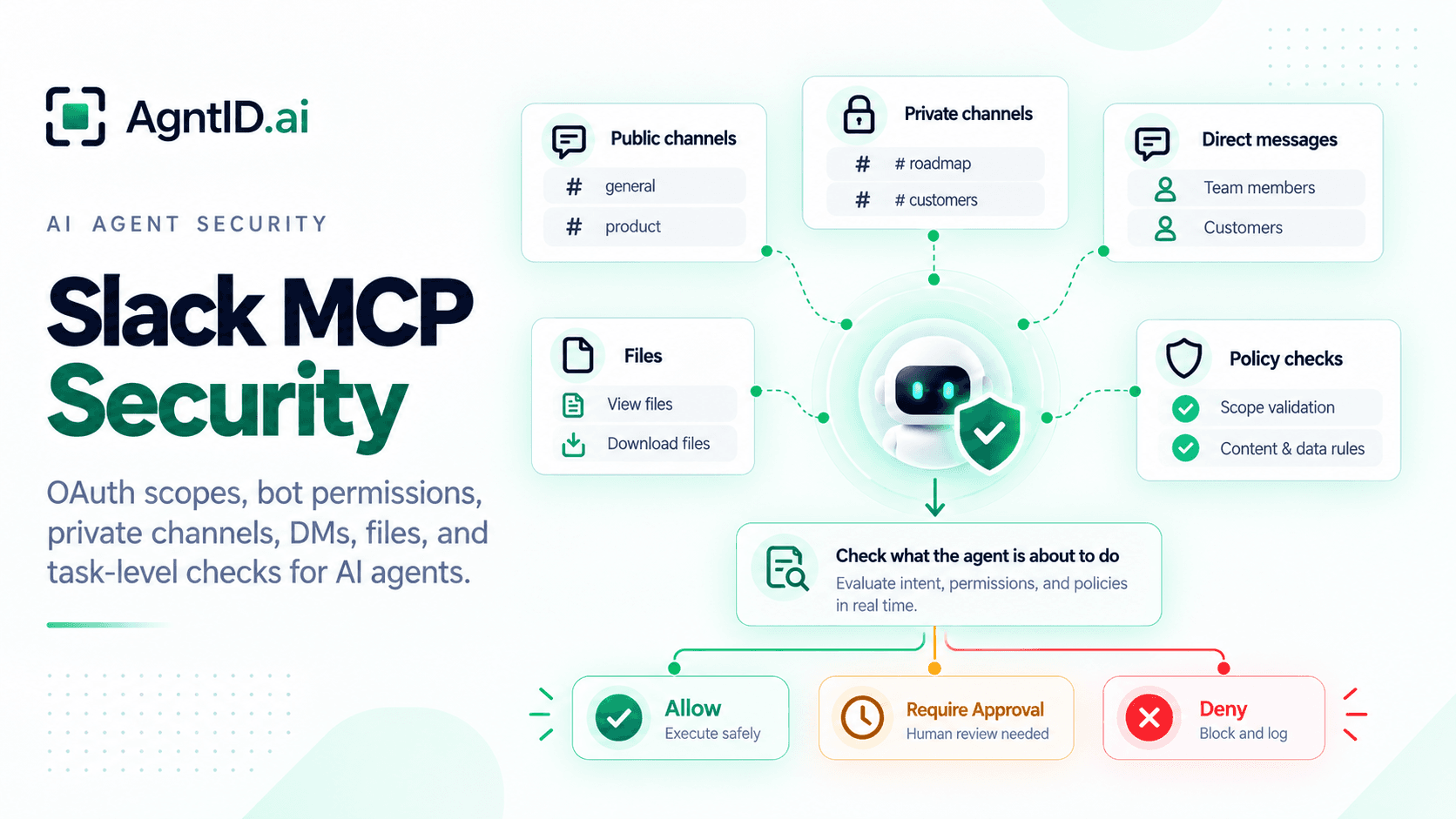
Slack MCP Security: OAuth Scopes, Bot Permissions, and Agent Access Control
A support leader asks an AI agent to summarize everything the team knows about a renewal risk. The agent searches Slack, finds a customer escalation in a public account channel, a pricing discussion in a private sales channel, a legal concern in a thread, and a screenshot shared as a file. The agent drafts a summary and offers to post it in #sales.
Every step looks useful. Every step also crosses a different Slack boundary. Slack is not only a chat tool. It is where customer conversations, incident rooms, HR context, executive discussions, security alerts, sales negotiations, and informal operational decisions happen. Much of that context never reaches a ticket, CRM, wiki, or system of record.
Slack already provides the app, token, scopes, channel, and audit foundation. The harder question appears when an agent starts acting through that access. A Slack app may have the right scope. A bot may be in the right channel. A user token may reflect what the user can see. The agent action can still be wrong for the task.
Slack MCP security should answer a practical question: should this agent take this Slack action, in this channel, with these arguments, for this task?
What Slack MCP Security Needs to Control
Slack access is not simply read vs write. A Slack agent may read a public channel but not a private channel. It may summarize a thread for members of that thread but not post the summary somewhere else. It may draft a reply but not send it. It may read file metadata but not open the file. It may use a bot token in approved channels but avoid user-token access unless the task requires the user’s own Slack context.
Use this matrix to classify Slack MCP actions before granting broad access.
| Slack MCP action | Slack object | What can go wrong | Required control |
|---|---|---|---|
| Search messages | Public channels, private channels, DMs, multi-person DMs | Sensitive context appears in results | Scope limits, channel rules, and task checks |
| Read channel history | Channel or private channel | More conversation context is exposed | Membership checks and time-window limits |
| Read thread | Thread inside a channel or DM | Hidden decision context leaks | Source and requester validation |
| Summarize conversation | Channel, thread, DM, or multi-person DM | Private context moves to a new audience | Destination checks and output policy |
| Draft reply | Message or thread | Low-risk preparation becomes high-risk send | Separate draft and post permissions |
| Post message | Channel, private channel, DM, or thread | Agent creates operational impact | Approval for high-risk destinations |
| Read file | File shared in Slack | Contracts, logs, screenshots, or customer data leak | File-type and source-channel policy |
| Upload file | Channel or DM | Sensitive artifact is shared broadly | Approval and destination controls |
| Create conversation | Channel, group DM, or IM | Agent changes communication structure | Restricted tool access and approval |
Slack-side controls define what the app can access. Task-level checks decide what the agent should do with that access. A policy that works for #release-updates may be wrong for an HR DM, an incident room, a legal thread, or a customer negotiation channel. Slack MCP security has to stay close to the Slack object, the user, and the task.
Slack App Authentication Starts With Token Design
Slack tokens define the outer boundary of access. They tie together the scopes and permissions an app has obtained. Slack supports multiple token types, including bot tokens and user tokens. Bot tokens represent a bot associated with an installed Slack app. User tokens represent workspace members and allow an app to act on behalf of the authorizing user when needed.
For Slack MCP, that distinction matters. A bot token works well when the agent should act as an app with its own identity. The bot can be invited to approved channels. Its channel membership becomes part of the security boundary. A user token works when the agent needs the user’s own Slack context. That may be necessary for personal assistants, account workflows, or workflows where the agent must answer based on what a specific user can see.
User tokens need tighter controls because they can reflect the Slack conversations and resources the user can see. A release-note agent should usually not need user-token access. A support triage agent may only need bot access to approved customer channels. A personal productivity agent may need user-token access, but should be restricted by task, channel type, and destination. The token defines what may be possible. It does not decide what is appropriate for the task.
What Slack OAuth Scopes Control
Slack scopes define what an app can access or do. They decide whether the app can read messages, post to conversations, view user information, access files, or use other Slack API capabilities. For Slack MCP, scopes map to concrete agent capabilities. Search may involve public channels, private channels, DMs, and multi-person DMs. Reading messages may require history scopes. Posting uses Slack write permissions. File access uses file scopes.
Those controls matter. They define the app boundary. The agent still needs task-specific rules. A token may have channels:history. That does not mean the agent should read every channel for every task. A token may have chat:write. That does not mean the agent should post into an incident room. A token may have files:read. That does not mean the agent should open a contract attached to a sales thread.
Slack scopes answer one question: can the app use this class of Slack access? Task-level checks answer the next question: should this agent use that access for this task?
Public Channels, Private Channels, DMs, and Threads Need Separate Rules
Slack conversation types carry different expectations. A public channel may still contain sensitive information, but it is designed for broader discovery. A private channel is a deliberate access boundary. A DM is a personal conversation. A multi-person DM often behaves like an unnamed private channel. A thread can contain the real decision even when the parent message looks harmless.
Slack’s conversations.history method shows why token type and conversation type matter. With the right history scope, a bot token can access conversations where the bot is a member. A user token can access any private conversation the user is a member of and all public conversations. That is a major difference for agents.
A Slack MCP policy should treat these surfaces separately. Public-channel search may be allowed for approved business channels. Private-channel reads should require requester membership and task fit. DM access should be denied by default unless the product is explicitly a personal assistant. Multi-person DM access should be reviewed like private-channel access. Thread access should inherit the sensitivity of the parent conversation. The policy should also control movement between surfaces because the source and destination both matter.
Why Message History Needs Careful Rules
Message history is where Slack MCP becomes most sensitive. Slack messages contain decisions, objections, customer names, informal approvals, pasted logs, screenshots, credentials, pricing notes, security alerts, and private commentary. An agent does not need malicious intent to expose this context. It only needs a broad token, a broad prompt, and a destination that is easier to share than the source.
A safer model is to make message history access narrow. Start with a small channel allowlist. Keep private-channel and DM history scopes out of general-purpose agents. Limit searches by channel type, channel ID, time window, user, or task. Keep full-channel history reads separate from targeted thread reads. Treat incident rooms, HR channels, legal channels, executive channels, and customer-negotiation channels as high-risk by default.
A good Slack MCP policy should also decide what the agent can do with retrieved messages. Can the agent summarize private-channel messages? Can the summary include names or customer-specific details? Can it include links to source messages? Can the output move to another channel? Can the output be sent to a user who was not part of the source conversation? These questions require task-level checks.
Posting Needs Different Rules Than Reading
Posting is not just writing text. A Slack message can trigger action. It can tell engineering to roll back a deployment. It can tell sales that legal approved a term. It can update a customer channel. It can declare an incident resolved. It can create confusion when the agent sounds more certain than the source material supports.
Slack’s chat.postMessage method sends messages to channels. The same method can post to public channels, private channels, and DMs depending on the authenticated user’s permissions and the channel argument. Slack also notes that new Slack apps do not start with the ability to post in all public channels, and chat:write.public is needed for broad public-channel posting.
For agents, the policy should separate draft, reply, post, schedule, and broadcast. Drafting a reply can be allowed more often because the user remains in control. Posting a reply inside the same thread can be lower risk than posting a new top-level message. Broadcasting a thread reply should require more caution. Scheduling a message should be treated like posting because the business impact occurs later. Posting in executive, HR, legal, security, incident, customer-facing, or sales-negotiation channels should usually require approval.
Files, Canvases, and Lists Are Not Just Attachments
Slack MCP also reaches beyond messages. Files can include contracts, customer exports, incident screenshots, logs, resumes, offer letters, security reports, roadmap decks, or CSVs. Slack’s files:read scope allows viewing files shared in channels and conversations that the Slack app has been added to.
Files need their own rules. An agent allowed to summarize a channel should not automatically read every file in that channel. An agent allowed to read file metadata should not automatically open file contents. An agent allowed to open a file should not automatically upload or share a new file.
Canvases and lists also need separate treatment. A canvas may contain project documentation. A list may contain structured work records. These objects may be closer to a system of record than ordinary chat. Slack MCP policy should classify messages, threads, file metadata, file contents, canvases, lists, and uploaded artifacts separately. A single “Slack read” permission is too broad for agent workflows.
Slack MCP Policy Examples
Here are concrete policies that fit Slack-native workflows.
| Workflow | Suggested policy |
|---|---|
| Support agent summarizes customer channels | Allow approved account channels. Deny DMs. Require approval before including private-channel content. |
| Incident agent summarizes an incident room | Allow named incident channels. Limit by time window. Require approval before posting external updates. |
| Sales agent drafts renewal updates | Allow draft replies from approved sales channels. Deny auto-posting pricing or legal terms. |
| Engineering agent searches release discussions | Allow public engineering and release channels. Deny security, HR, and executive channels. |
| Personal assistant searches user Slack | Use user-token access only for the authenticated user. Deny sharing private results outside the source context. |
| Agent uploads a file to Slack | Require task match, file classification, and destination approval. |
| Agent posts to a customer-facing channel | Require human approval unless the message matches a low-risk approved template. |
These policies work because they bind Slack objects to the task. The policy does not say “allow Slack.” It says which Slack action is allowed, against which Slack object, for which task, under which conditions.
Where Task-Level Checks Fit
Slack OAuth, scopes, app approval, channel membership, and audit logs are necessary. They establish the Slack-side access model. They do not need to be replaced. The next decision happens when the agent is about to act.
Before a Slack MCP tool call runs, the check should evaluate the user requesting the task, the agent identity, the token type, the Slack tool, the action type, the channel or conversation type, the source channel, the destination channel, the thread timestamp, the file ID, the message text, the task, and the policy for that task.
This is not a replacement for Slack controls. Slack remains the system that defines the app, token, scopes, workspace access, channel membership, and Slack-side audit trail. The next question appears when the agent is about to act: once an agent has a valid Slack tool available, should this specific tool call run for this specific task?
This is where AgntID fits. AgntID complements Slack at the point where the agent is about to act. It checks the task, tool, arguments, channel, thread, file, user, token type, and destination before the Slack action runs. Based on policy, the action can be allowed, denied, narrowed, or sent for approval. The Slack app may have the scope. The agent still needs the task-specific authority.
Slack MCP Security Checklist
Use this checklist before giving an AI agent Slack access through MCP.
1. Define the Slack use case
Document what the agent should do in Slack. Search messages, summarize channels, read threads, draft replies, post updates, upload files, or read canvases. Do not approve broad Slack access before the workflow is clear.
2. Choose the right token model
Use bot tokens when the agent should act as an app in approved channels. Use user tokens only when the agent needs user-specific context. Treat user-token access as higher risk because it can reflect what the user can see.
3. Minimize OAuth scopes
Request only the scopes required for the workflow. Separate search, history, files, posting, canvases, lists, users, and conversation creation.
4. Limit channel reach
For bot-token workflows, invite the bot only to channels where the agent should operate. Treat channel membership as a control, not an implementation detail.
5. Separate draft from post
Allow drafting more broadly than posting. Require approval for posts in incident, HR, legal, executive, security, customer-facing, and sales-negotiation channels.
6. Restrict private conversations
Deny private-channel, DM, and multi-person DM access by default. Allow only when the task clearly requires it and the requester has access to the source conversation.
7. Control source-to-destination movement
Check where the content came from and where the agent wants to send it. Private-channel content should not move to public channels without an explicit policy.
8. Treat files separately
Control file metadata, file reads, file uploads, and file sharing as different actions.
9. Add task-level checks
Evaluate every Slack MCP tool call before it runs. Include the task, tool, arguments, token type, channel, thread, file, user, and destination.
10. Keep an audit trail
Record which agent accessed which Slack object, for which task, with which decision, and what action ran.
Frequently asked questions
What is Slack MCP security?
Slack MCP security controls how AI agents access Slack messages, channels, threads, files, DMs, and posting actions through MCP.
What does a Slack MCP server let agents do?
A Slack MCP server can let agents search messages, read threads, summarize channels, draft replies, post updates, access files, and work with Slack conversations.
Are Slack OAuth scopes enough to secure Slack MCP?
Slack OAuth scopes define what the app can access. Task-level checks decide whether the agent should use that access for the current task.
What is the difference between a Slack bot token and a Slack user token?
A Slack bot token lets the app act as a bot. A Slack user token lets the app act on behalf of a user and access what that user can see.
Should Slack MCP use bot tokens or user tokens?
Use bot tokens for controlled app workflows. Use user tokens only when the agent needs a specific user’s Slack context.
Which Slack OAuth scopes are sensitive for MCP agents?
Sensitive Slack scopes include message history, private-channel access, DM access, file access, file upload, and message posting scopes.
Can a Slack MCP agent read private channels?
Yes, if the token, scopes, and channel membership allow it. Private-channel access should still require task-level approval.
Can a Slack MCP agent read DMs?
Yes, if the app has the right user token and scopes. DM access should be blocked by default for general-purpose agents.
Can a Slack MCP agent post messages?
Yes, if the app has posting permissions. Posting should have stricter controls than drafting because Slack messages can trigger business action.
How should teams secure Slack message history access?
Limit history scopes, restrict channel access, set time windows, and check whether the agent needs the messages for the current task.
How should Slack MCP handle files?
Treat Slack files separately from messages. File metadata, file reads, file uploads, and file sharing should each have separate controls.
How do task-level checks secure Slack MCP?
Task-level checks review each Slack MCP action before it runs. They look at the task, tool, channel, thread, file, user, token, and destination.
How does AgntID help with Slack MCP security?
AgntID checks Slack MCP actions before they run. It can allow, deny, narrow, or require approval based on the task and the Slack object involved.
What is the safest way to start with Slack MCP?
Start with a bot token, approved channels, minimal scopes, draft-only actions, and approval for posting, private channels, DMs, and files.
Further Reading
- MCP Security Best Practices — Review the core controls for Slack MCP authentication, tool exposure, credential handling, and production security.
- MCP Authorization — Understand how authorization should govern Slack tool discovery, channel access, and message actions.
- Runtime Access Control for AI Agents — See how runtime checks evaluate the agent's exact Slack tool call, channel, file, and task context.
- Least Privilege for AI Agents — Apply narrow scopes and scoped authority to reduce the blast radius of Slack agent actions.
- MCP Security Audit — Use a structured process to assess Slack MCP authentication, exposed tools, identity-specific access, and runtime testing.