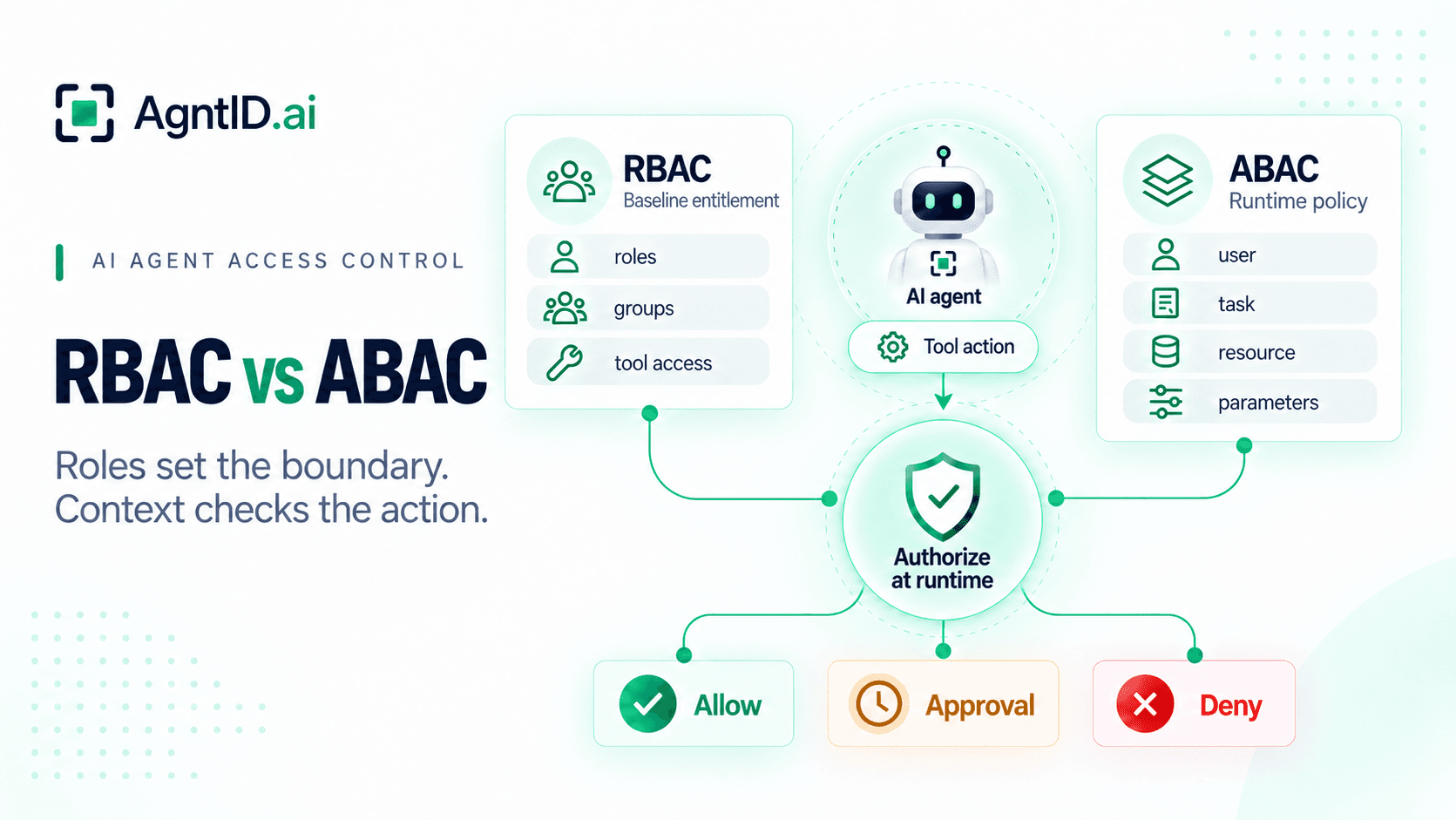
RBAC vs ABAC for AI Agents: Which Authorization Model Fits Agentic Systems?
RBAC vs ABAC is a familiar access control question. For AI agents, the question changes. Agents do not just access systems. They reason, choose tools, generate parameters, and act at runtime. A role can define what an agent may generally access. It cannot always decide whether a specific tool action should run for a specific task.
| Question | RBAC | ABAC |
|---|---|---|
| Decision basis | Roles and assigned permissions | Attributes evaluated by policy |
| Best agent use | Baseline access by agent type | Runtime authorization for specific actions |
| Example | A finance analyst agent can access billing tools | The agent can issue a refund only if amount, account, region, task, and approval match policy |
| Strength | Simple, reviewable access boundaries | Context-aware decisions |
| Weakness | Broad roles and role explosion | Attribute quality and policy complexity |
| Best fit | Stable responsibilities | User, task, tool, resource, environment, time, and parameter-based decisions |
The practical answer is not "RBAC or ABAC." Agentic systems usually need both. RBAC defines the outer boundary. ABAC, or contextual policy, decides whether an action should run now.
The decision point shifts at runtime
In a normal application, authorization often happens before the user does much work. The system checks the user's role, maps that role to permissions, and allows or denies access. That model still matters for agents because every agent needs a clear baseline for what systems and tools it may reach.
The harder decision comes later. Once an agent starts reasoning, it may choose a tool, select a resource, generate parameters, and act for a specific task. At that point, authorization needs more than the agent's role. It needs the user, task, tool, action, resource, environment, time, parameters, and approval state.
Why RBAC vs ABAC changes for AI agents
The final tool call may not be known when the session starts. That makes two questions separate:
- RBAC asks, "What authority can this agent generally hold?"
- ABAC asks, "Should this specific action be allowed in this context?"
NIST describes RBAC as a model where users receive roles and roles receive privileges. NIST's ABAC guidance describes decisions based on subject, object, action, and environment attributes. In agent systems, action and environment matter more because risk can change with each tool call.
Where RBAC works well
RBAC for AI agents is a useful foundation. Most organizations already manage access through roles, groups, and entitlements. RBAC works when permissions map to stable responsibilities:
- A research agent can read approved knowledge bases.
- A support agent can view CRM records and create case notes.
- A code review agent can read repositories and comment on pull requests.
- A finance analyst agent can query approved reporting datasets.
In these cases, roles create a clear baseline. Security teams can review the role, approve the tool set, assign it to agents, and remove it when the agent retires. RBAC also helps auditability. If an auditor asks why an agent could reach a system, the answer can point to a role, approval path, and permission set.
Read-only does not automatically mean low-risk. A read-only agent may still reach sensitive customer records, financial data, source code, or internal plans. RBAC may be enough only when the data scope is already approved for that agent's users, tasks, and context. When access depends on who is asking or which records are involved, roles alone become too coarse.
Where RBAC breaks down
RBAC breaks down when a role has to represent facts that change during execution. Take a finance analyst agent. Its role may allow access to invoices, payments, customer accounts, and refund workflows. That baseline is reasonable. The role still cannot answer every question before a refund runs:
- Which customer account is involved?
- Is the request tied to an approved billing dispute?
- Is the refund going back to the original payment method?
- Is the amount under the policy threshold?
- Is the account in the requester's region?
- Is the agent using the approved payment tenant?
- Does the ticket match the refund customer?
A team could try to solve this with more roles: refund under 500, refund over 500 with approval, EU refund, business-hours refund, enterprise refund, and so on. That creates role explosion. Roles multiply because static assignments are being used to represent dynamic facts. The result becomes harder to administer and harder to audit.
The deeper issue is precision. RBAC is good at defining who generally has access. Agentic systems also need to decide whether an exact action is safe under exact conditions.
Where ABAC becomes necessary
ABAC becomes necessary when authorization depends on runtime context.
| Attribute type | Agentic examples |
|---|---|
| User | Identity, department, region, authority, delegated scope |
| Agent | Agent ID, owner, assigned role, trust tier |
| Task | Purpose, ticket ID, workflow stage, risk level |
| Tool and action | Tool name, read, create, update, delete, refund |
| Resource | Account, file, repository, data class, environment |
| Time and environment | Business hours, production, region, tenant |
| Parameters | Refund amount, destination, branch name, record count |
| Control state | Approval, exception, policy version, change ticket |
These attributes let policy separate actions that look similar at the tool level. A coding agent may have access to a repository tool. Contextual policy can allow branch creation in a development repository while denying default branch deletion. A finance analyst agent may have access to a payment tool. Contextual policy can limit which refunds run without approval.
ABAC is not free. Attributes must be accurate and available before execution. Policies need owners, reviews, and logs. For audit and compliance, teams must show why policy allowed an action and whether the attributes were current.
Concrete scenario: finance analyst agent issuing a refund
Imagine a finance analyst agent investigating a billing dispute. The agent has the finance_analyst role. That role allows the agent to read invoices, view payments, and request refunds through the billing tool. The role should not authorize every refund. When the agent proposes a refund, policy evaluates the runtime context:
Allow when:
- agent.role = "finance_analyst"
- task.type = "billing_dispute"
- tool.action = "issue_refund"
- refund.amount <= 500
- refund.destination = original_payment_method
- account.region = requesting_user.region
- ticket.status = "open"

Require approval when:
- refund.amount > 500
- customer.tier = "enterprise"

Deny when:
- refund.destination differs from original payment method
- environment is not the approved billing tenant
- ticket.customer_id does not match refund.customer_id
RBAC grants baseline access to the refund workflow. ABAC decides whether this refund should run for this customer, amount, destination, task, and environment. Without RBAC, every decision starts from raw policy. Without ABAC, the agent may hold broad standing authority that fits one task and creates risk in another.
When to use RBAC, ABAC, or both
Use RBAC when access follows a stable role. Use ABAC when the decision depends on attributes such as task, amount, destination, environment, time, or approval state. Combine RBAC and ABAC when roles define useful access boundaries, but runtime context changes action risk:
| Situation | Recommended model | Why |
|---|---|---|
| Read-only agent for one approved data source | RBAC may be enough | Data scope is approved and stable |
| Multiple agent types need different tool sets | RBAC | Roles create clear baseline boundaries |
| One agent acts for many users | RBAC + ABAC | User authority should narrow each action |
| One tool supports safe and risky actions | RBAC + ABAC | Tool access is too broad by itself |
| Amount, destination, resource, or environment changes risk | RBAC + ABAC | Runtime facts drive the decision |
| High-impact action needs approval | RBAC + ABAC | Approval state becomes part of policy |
| Teams are creating many condition-specific roles | Add ABAC | Attribute policy can reduce role explosion |
A layered model usually works best:
- Identify the agent and the user or system behind the request.
- Use RBAC to define which systems, tools, and broad actions the agent may reach.
- Capture runtime context when the agent proposes a tool action.
- Evaluate policy using task, resource, environment, time, parameters, and approval state.
- Enforce the decision before the tool action runs.
- Log the decision with the policy version and relevant context.
Layered authorization connects AI agent permissions with runtime authorization. Permissions define what the agent could do. Runtime authorization determines what the agent may do now.
How AgntID applies this model
AgntID provides runtime access control enforcement for AI agents. Existing IAM systems can remain the source for identities, roles, groups, and baseline entitlements. AgntID complements that layer at runtime by evaluating policy and task intent before a tool action runs.
AgntID scopes access for the approved action. It narrows credentials at execution time so the agent receives least-privilege, just-for-task access instead of broad standing permissions. Enforcement stays inside the customer's infrastructure. AgntID works with existing IAM systems, tools, and MCP servers, and can support pass-through or AgntID-issued credentials depending on the deployment model.
This is why the conclusion is not "ABAC replaces RBAC." RBAC defines baseline entitlement. Contextual policy defines whether the current action is authorized. Runtime enforcement stops disallowed tool calls before they reach the target system.
For agents, the practical model combines RBAC for the outer boundary, policy and task intent for each action, credential narrowing for per-action access, runtime enforcement inside customer infrastructure, and decision logs. Policy-as-code helps teams version, review, test, and deploy these authorization rules.
Bottom line
RBAC remains useful for AI agents because it gives teams simple, reviewable baseline access. ABAC becomes necessary when a decision depends on the user, task, tool, resource, environment, time, parameters, or approval state.
The strongest model combines both. Use roles to define what authority an agent can generally hold. Use contextual policy to decide whether a proposed action is allowed, denied, or requires approval. Enforce that decision before the tool call runs. That is how teams move from broad agent access to least-privilege, just-for-task control.
Frequently asked questions
What is the main difference between RBAC and ABAC?
RBAC makes access decisions from roles. ABAC makes access decisions from attributes. In agent systems, RBAC defines baseline authority, while ABAC evaluates the specific user, task, tool, resource, environment, and parameters at runtime.
Is ABAC better than RBAC?
ABAC is better for context-dependent decisions. RBAC is better for simple baseline access. For AI agents, the stronger model usually combines both because agents need broad entitlements and action-level checks.
When should you use ABAC vs RBAC?
Use RBAC for stable roles and predictable access. Use ABAC when access depends on the user, task, resource, environment, time, parameters, or approval state.
Can RBAC and ABAC be combined?
Yes. RBAC and ABAC can be combined in a layered model. RBAC sets the baseline permissions. ABAC then uses role as one attribute among others to decide whether a specific action should run.
What is RBAC vs ABAC in NIST terms?
NIST describes RBAC around users, roles, permissions, and privileges. NIST describes ABAC around attributes of the subject, object, action, and environment. For agents, those attributes map well to user, task, tool, resource, runtime context, and action parameters.
Is ABAC harder to audit than RBAC?
ABAC can be harder to audit because the decision depends on policy and attribute data. Teams need logs that show which policy ran, which attributes were evaluated, and whether those attributes were current.
What does an RBAC vs ABAC diagram usually show?
An RBAC vs ABAC diagram usually shows RBAC as a role-to-permission path and ABAC as a policy decision that evaluates multiple attributes. For AI agents, the diagram should show RBAC first as the baseline boundary, then runtime policy before the tool action executes.
How does RBAC vs ABAC apply to AI agents?
AI agents need RBAC for baseline access to systems and tools. They need ABAC or contextual policy when runtime facts change the risk of an action, such as refund amount, target account, data sensitivity, environment, or approval state.